ginnyb71168091
Participant
Oct 4, 2017 9:09 PM UTC
Answered

can't print pdf to fit the page

pdf in email shows 147%. when I change to "fit to page" or to 100% it still prints 147%.  now what?  HP support indicates it is the Adobe Reader problem not theirs.

This topic is closed to new replies. Start a new post to keep the conversation going.
Abambo
AbamboCorrect answer
Community Expert
Oct 17, 2017 9:52 AM UTC

Print options in Acrobat:

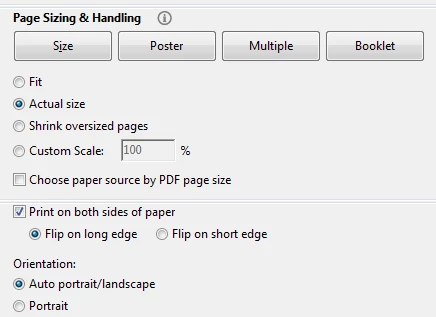
FIT: Fits what ever you want to print to the page size you selected to the useful print size (if your printer prints with a border, it fits to this border)

ACTUAL SIZE: Prints your design at design size (100%) regardless of the page size.

SHRINK: Assures printing the whole document on the print size, shrinking only if the document is to big.

CUSTOM SCALE: Your choice of a print size.

If, however, your printer applies additional scaling that is not communicated to Acrobat by the printer driver, then those scaling factors are applied too!

ABAMBO | Hard- and Software Engineer | Photographer

3 replies

Abambo
Community Expert
AbamboCommunity ExpertCorrect answer
Community Expert
Oct 17, 2017 9:52 AM UTC

Print options in Acrobat:

FIT: Fits what ever you want to print to the page size you selected to the useful print size (if your printer prints with a border, it fits to this border)

ACTUAL SIZE: Prints your design at design size (100%) regardless of the page size.

SHRINK: Assures printing the whole document on the print size, shrinking only if the document is to big.

CUSTOM SCALE: Your choice of a print size.

If, however, your printer applies additional scaling that is not communicated to Acrobat by the printer driver, then those scaling factors are applied too!

Translate
ABAMBO | Hard- and Software Engineer | Photographer
Legend
Oct 17, 2017 8:47 AM UTC

The size you choose on screen is not relevant to printing. Choose print options as needed.

Translate
AnandSri
Legend
Oct 4, 2017 11:41 PM UTC

Hi Ginnyb,

As per the description above, you are not able to print the PDF file to 100%, Is that correct?

Please refer to the following KN doc for the troubleshooting steps: Scale or resize printed pages in Acrobat and Reader  Link: https://helpx.adobe.com/acrobat/kb/scale-or-resize-printed-pages.html

You may also check for any pending updates of Reader from Help>Check for updates.

Hope this works, and keep us posted  with the results.

Regards,

Anand Sri.

Translate