


Inspiring
December 2, 2025
Answered

Can't reinstall acrobat -- missing AcroRead.msi file

  • December 2, 2025
  • 1 reply
  • 164 views

Hi, 

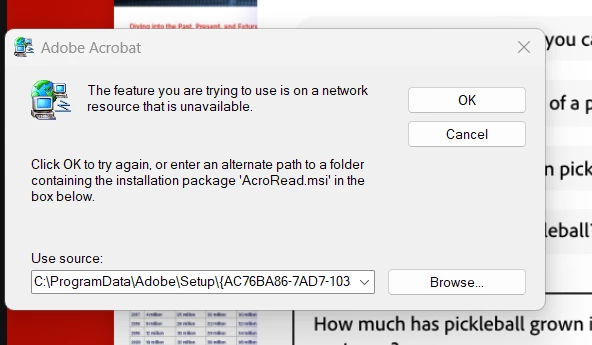
I tried to use Acrobat Pro today and it kept crashing as soon as it was opened, so I uninstalled it with Revo Uninstaller and then tried to reinstall it from Creative Cloud.  I keep getting and error message about needing a path to AcroRead.msi (see attached png image).  How can I get acrobat installed?  Thanks.

Zaffer867394iB3F6CA061D440B5B.png
Correct answer Meenakshi_Negi

Hi Zaffer,


Thank you for reaching out, and sorry about the trouble caused.


Please ensure that the Acrobat is uninstalled and all the related folders are removed. You may use the cleaner tool to check that: https://adobe.ly/4pOyAws


Then please try installing Acrobat using the steps suggested here: https://adobe.ly/4pQogEd


Let us know if you still get the same error.


Thanks,

Meenakshi

1 reply

Meenakshi_Negi
Meenakshi_NegiCorrect answer
Legend
December 3, 2025

Hi Zaffer,


Thank you for reaching out, and sorry about the trouble caused.


Please ensure that the Acrobat is uninstalled and all the related folders are removed. You may use the cleaner tool to check that: https://adobe.ly/4pOyAws


Then please try installing Acrobat using the steps suggested here: https://adobe.ly/4pQogEd


Let us know if you still get the same error.


Thanks,

Meenakshi
