
Participant
Aug 7, 2016 10:01 PM UTC
Question

Can't select paper sizes to print

Acrobat DC

Windows 10 Pro

Epson WF-7520

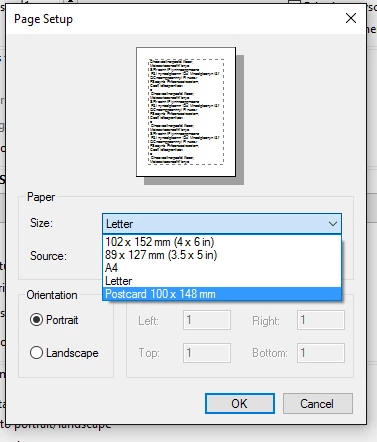
Acrobat won't allow me to select the proper paper size I need to print - most importantly a legal size or an 11x17.

I've done everything I can think of - updated printer driver, restarted computer and printer, tried to manually select paper size on the WF-7520. But Acrobat will only allow me to select a five different paper sizes. See screen shot.

HELP!!!
This topic is closed to new replies. Start a new post to keep the conversation going.

22 replies

bzurc
Participant
Dec 16, 2020 8:00 PM UTC

Landed here having the same issue. Deflated and with a deadline, I opened pdf w/ Edge and it was a seemless print to tabloid/11x17...didn't even have to change any settings, all was recognized as one would hope. 


Ironically, I had just reassigned Adobe Reader as pdf default on my Windows machine because I need/want to be able to use Adobe keyboard shortcuts - Edge seems, I don't know... focused on tablet-moving-around-style?  


I've noticed as all the software giants move towards subscription-based licensing, that more and more basic (and useful) tools and options move to paid versions of software/apps... for now, native os apps for handling/printing might be the way to go? I use Preview over Reader on my macs. Luckily, they have long shared/grandfathered keyboard shortcuts that jive across products. (Plus, it's generally more useful for me!) 


But, I ramble... yah, try letting edge open/print if you're Windows and Preview if you're OSX. 

Translate
Participating Frequently
Dec 16, 2020 11:10 PM UTC

What I ended up doing to solve the problem was to downgrade the printer driver to the prior version. The latest seems to have a bug.

Translate
Participating Frequently
Sep 16, 2020 6:13 PM UTC

This is apparently an Epson issue and downgrading the software and drivers to an earlier version fixed the problem. Of course, Epson keeps trying to update it all again.

Translate
Participant
Sep 16, 2020 10:26 PM UTC

Could you be more specific ? Working driver version ? I suppose you have to disable the automatic update of Epson drivers. Also has anyone badgered Epson to fix the problem ?

Translate
Participating Frequently
Sep 17, 2020 1:21 AM UTC

Unfortunately I cannot or I would have done so. I run Linux primarily and do not have a Windows system here to check. I can say that the problem I had was about six months ago and whichever version was current at the time, I reinstalled the version just prior.

Translate
Participant
Jun 25, 2020 8:17 PM UTC

I am still using Adobe Pagemaker 7.0 and it also doesn't have a choice for the lower paper tray connected to my Epson WF-7720. Or to the rear feed which could also be an option. Is the program too old or is it something else? 

Translate
Participant
Aug 16, 2020 10:00 PM UTC

This is maddening: the Epson 7520 printer is quite common and works fine with all the main applications used on Win 10 but one: Acrobat Reader DC. There is just no excuse for not having solved this problem 4 years ago. I am abandonning Acrobat Reader DC: advanced features are totally useless if the basic functions such as printing are no longer available or degraded. Acrobat XI works perfectly (with latest Win 10 updates)  using all the features of this very versatile 7520 printer. Until further notice that will be my only practical solution for printing manuals with a  mix of page sizes (schematics are often legal or 11x17 formats). Adobe had something working and broke it. No kudos. 

Translate
Participant
Sep 16, 2020 5:54 PM UTC

I too am in the same boat. I need Ledger, to be able to choose paper tray for the 11x17 paper, and two-sided printing is also missing. Who is monitoring this page? clearly not Adobe.

Translate
Participating Frequently
Jun 16, 2020 12:57 AM UTC

Same problem for me too. When printing from any other application, the printer driver allows me to select ledger size but not from Acrobat or Acrobat Reader. Someone said that Acrobat uses the Windows driver but the printy interface appears completely different when in Acrobat and there are only a few paper choices when the printer is capable of far more. It seems that Acrobat isn't getting everything being reported.

Translate
jamesi397977
Participant
Dec 28, 2018 11:37 AM UTC

I am also having this problem. Why has this not been solved in 2 years?

Translate
Lukas Engqvist
Community Expert
Community Expert
Dec 28, 2018 12:56 PM UTC

The Page Setup dialogue is not part of the Acrobat interface, but is dependent on the Operating System and Printer Driver. Sorry did not see this before or I would have answered.

Translate
Adorobat
Participating Frequently
Aug 11, 2016 12:33 AM UTC

Hi shawnvader  ,

Could you please tell if this is happening with a specific document or with other documents as well?

Have you tried to print from other applications like MS Word or Notepad?

Try to print to Adobe PDF and check if you are getting options to change Page Setup.

Also , try to print from other application and check if you are getting the same options in there as well.

Let us know about the results.

Thank You!

Shivam

Translate
Participant
Sep 26, 2016 5:22 AM UTC

Having exactly the same problem.  I'd take a screen shot but it looks the same as above.  Was there an actual answer to this problem?

Translate
Adorobat
Participating Frequently
Sep 29, 2016 8:57 PM UTC

HI GElevations ,

Have you tried printing to Adobe PDF?

Select Adobe PDF from the printer's list and check if you are getting other paper sizes as well under Page Setup.

Let me know the results.

Thank You,

Shivam

Translate