

Participant
Apr 17, 2024 11:10 PM UTC
Question

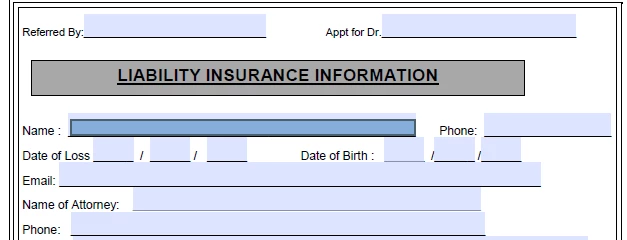
Can't type in fillable form

How can i get rid of this blue box it doesnt let me type.

24 replies

barbara_a7746676
Community Expert
Community Expert
Mar 14, 2025 4:29 AM UTC

The blue box looks like it might be a comment. If that is the case, choose Comments to get the commenting tools. You should then be able to select and delete the box.

Translate
Meenakshi_Negi
Legend
May 2, 2024 8:58 AM UTC

Hi All,


Thank you for your patience so far.


The issue has been resolved. Please reboot the machine and then relaunch Acrobat.

Then wait for some time and try again to fill the forms. 


Let us know how it goes.


Thanks,

Meenakshi


Marking a reply or response “Correct” will help future users with the same issue quickly identify the correct answer.

Translate
Participant
Apr 22, 2024 8:25 AM UTC

To resolve the issue with the blue box hindering typing in GB WhatsApp Pro, try adjusting the app settings. Look for options related to input or chat settings. You may need to disable or modify a feature causing this interference. If the problem persists, consider reinstalling the app or checking for updates to ensure compatibility with your device's operating system.https://goldwhatsappapk.com/ 

Translate
Participant
Apr 19, 2024 1:15 PM UTC

Has anyone figured out a real solution to this?  This is absolutely HORRIBLE and makes just editing or copy/pasting from a pdf a nightmare.

Translate
Kirk B
Inspiring
Apr 19, 2024 1:19 PM UTC
Revert to prior version. See the link I posted in another reply.
Translate
Meenakshi_Negi
Legend
Apr 19, 2024 5:44 AM UTC

Hi All,


Thank you for sharing the information. It has been reported to the team, and they are looking into this.

We will update you once we have more information from the team. We appreciate your patience.


Thanks,

Meenakshi

Translate
Participating Frequently
Apr 19, 2024 12:52 PM UTC

I came back to work this morning and IT IS DOING THE SAME THING!!! This is rediculous!!!! I am so set back and uninstalling and reinstalling only fixed it for a short time YESTERDAY!!! I am livid!!!! 

Translate
Participating Frequently
Apr 19, 2024 1:59 PM UTC

I hope this shows up... I have lost so much work time trying to fix this problem because i used acrobate for almost everything in my line of work.  I logged in online and went to my settings and i unchecked "DISABLE FORM FIELD DETECTION" - then opened my acorbat app on my computer and the horrendous blue boxes are not there and I am able to fill my forms in finally. I'm afraid this won't last because of all the drama this recent update created and I feel like I'll junx myself. But, it's working now!

Translate
Kirk B
Inspiring
Apr 18, 2024 11:38 PM UTC

I was able to revert back to the old interface and it fixed the problem but it's in the old layout.  I don't care.  I just needed it to WORK.  Here's a link to a video that explains how to revert back to the old version.  https://www.youtube.com/watch?v=YvJtKiMVz8M

Translate
Participant
Apr 19, 2024 12:08 AM UTC

Thanks Kirk B  - I'm with you, dont care if it looks like the older layout as long as it works.  Come on Adobe, we pay for this program and there is obviously something happening - its the general public that are solving your problems.  I haven't seen Adobe offering any advise how to fix !?!

Translate
Kirk B
Inspiring
Apr 19, 2024 12:57 AM UTC

It's frustrating. It's so obvious that there's a problem with their last update.  Many of us rely on these products to earn a living.


Translate
Participant
Apr 18, 2024 11:36 PM UTC

Same problem here - started yesterday 18.4.24 (Australia) & now has occured on another computer 19.4.24  - something has changed - please advise ASAP how to fix.   Document properties all show ' Allowed'


Translate
Kirk B
Inspiring
Apr 18, 2024 11:39 PM UTC

I did this and it worked.  I couldn't care less that it's the older layout.  https://www.youtube.com/watch?v=YvJtKiMVz8M

Translate
Kirk B
Inspiring
Apr 18, 2024 11:28 PM UTC

I've uninstalled and reinstalled Acrobat, but it still doesn't work.  

Translate
Participating Frequently
Apr 19, 2024 12:24 AM UTC

Shoot, that wss the only thing that worked for me. I uninstalled just the acrobat and then went to adobe cloud and had to wait forever for it to redownload. 

Translate
Kirk B
Inspiring
Apr 18, 2024 11:18 PM UTC

I'm having the same freaking problem!!!!  I can edit for just a second then the field turns blue and I can't edit anymore.  Come on Adobe!  What did you do? 

Translate
Participating Frequently
Apr 18, 2024 3:46 PM UTC

I am having the same issue and I was not having this issue yesterday. Very frustrating and setting my productivity back. 

Translate