


Participant
April 24, 2025
Answered

Cannot add an Initials Form Component in Acrobat?

  • April 24, 2025
  • 1 reply
  • 406 views

I'm using Acrobat 25.1. When I click "Edit > Prepare a Form" I can see all of the form components that I can add. There is a Digital Signature component, but I don't see a Digital Initials component. I swear I've seen an intials component in the past, am I missing somthing?


Also, if I already have a text component, is there any way to convert it to a form component like Digital Signature, Initials, or Date?

Correct answer Meenakshi_Negi

Hi YangTegap,


Thank you for reaching out.


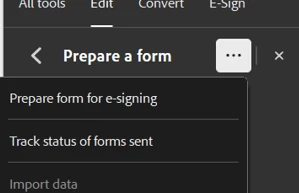
The form field to add an initial as a signature is provided under the Acrobat Sign form. Please click the three dots next to Prepare Form and select "Prepare form for e-signing". Then you can see the option to add the Initials Field. Check the screenshot below for reference:


Could you please share more details on what you mean by text component? It would be helpful if you could share the screenshots. That will help us to understand what you are trying to do, and we can provide the correct information. 


If you would like more information on creating a Form, please refer to the following help document: https://adobe.ly/42LmRF0

Feel free to let us know if you have any questions.  


Thanks,

Meenakshi

1 reply

Meenakshi_Negi
Meenakshi_NegiCorrect answer
Legend
April 24, 2025

Hi YangTegap,


Thank you for reaching out.


The form field to add an initial as a signature is provided under the Acrobat Sign form. Please click the three dots next to Prepare Form and select "Prepare form for e-signing". Then you can see the option to add the Initials Field. Check the screenshot below for reference:


Could you please share more details on what you mean by text component? It would be helpful if you could share the screenshots. That will help us to understand what you are trying to do, and we can provide the correct information. 


If you would like more information on creating a Form, please refer to the following help document: https://adobe.ly/42LmRF0

Feel free to let us know if you have any questions.  


Thanks,

Meenakshi

YangTegapAuthor
Participant
April 24, 2025

Thank you so much!!