Hi @andrej_0027,
Thanks for sharing the detailed steps you’ve already tried — that helps narrow things down.
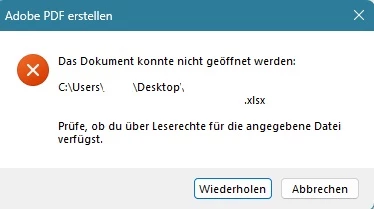
Since the issue persists despite permission adjustments and running Acrobat as Administrator, here are a few additional things you might consider checking:
1. Antivirus or Endpoint Security Software
Some antivirus programs or corporate endpoint protection tools (e.g., CrowdStrike, Sophos, Windows Defender) may silently block attachments involving executable content or Office files. Try temporarily disabling real-time protection (if permitted) and test again.
2. Trusted Locations in Acrobat
Go to Edit > Preferences > Security (Enhanced) and try:
-
Disabling “Protected Mode at startup” temporarily
-
Adding the file’s folder to Trusted Locations
-
Restart Acrobat after applying these changes
3. Excel File Permissions at System Level
Right-click the Excel file → Properties → Security tab, and ensure:
4. Try Attaching via Acrobat’s “Insert from File” Instead
Instead of drag-and-drop or right-click, try:
If the issue continues, please let us know:
-
The exact Excel file type (.xls, .xlsx, macro-enabled?)
-
Whether the file is stored locally or on a network/share/cloud folder
-
Your Windows and Acrobat versions
Also, looking from the other angle, considering I don't have full information available:
In case: IT-Managed Restrictions (GPOs, Endpoint Security, DLP)
In enterprise environments, IT admins often apply Group Policy Objects (GPOs) or Endpoint Protection/DLP policies that:
-
Restrict attaching or opening certain file types (like .xls/.xlsx)
-
Limit Acrobat’s access to system folders or temp directories
-
Force “Protected Mode” on with strict access isolation
Even if the file appears accessible, Acrobat may be blocked from reading or copying it for attachment due to these policies.
In case: Non-Persistent User Profiles (e.g., VDI, Citrix, FSLogix)
In setups where user profiles reset on reboot or logoff, the following issues may arise:
-
Acrobat fails to retain trust or access settings between sessions
-
Temp/cache folders Acrobat relies on may not exist or may have restricted access
-
Folder redirection or user virtualization layers might interfere with file handles
Acrobat may interpret these I/O errors as “Access Denied”, especially if temp or profile folders aren’t writable during runtime.
Best regards,
Tariq | Adobe Community Team



 AdChoices