


Participant
September 13, 2025
Question

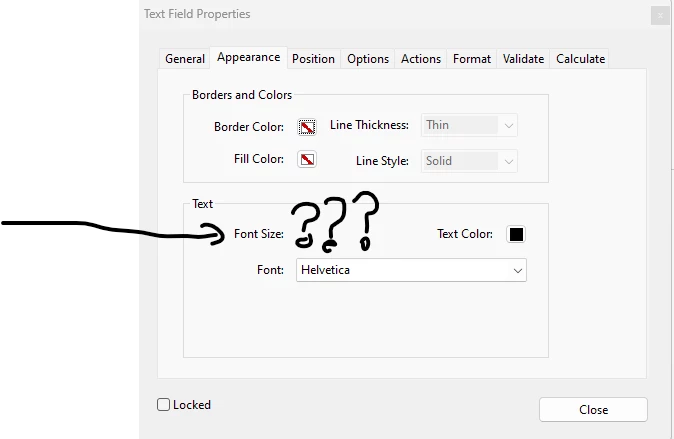
Cannot change the font within form fields

  • September 13, 2025
  • 2 replies
  • 149 views

When I check the Properties>Appearance window within Adobe acrobat pro it doesnt present the opportunity to change the font size, only the option to change the font.

this means I cannot fit text into fields of my own choosing.
2 replies

Participant
September 13, 2025

I had the same issue once, and a quick trick I found while browsing Pak game forums was to adjust the text field properties under “Prepare Form” mode that finally let me resize the text properly.

creative explorer
Community Expert
Community Expert
September 13, 2025

@kyle_4158 that's bizarre?! Did you 'Prepare your Form?' 


m
kyle_4158Author
Participant
September 13, 2025

Solved my problem by restarting the computer. Facepalm. But yeah that was the problem for half my day.