
Participant
October 17, 2024
Question

Cannot edit one page of a 3 page pdf

  • October 17, 2024
  • 2 replies
  • 457 views

I have a three-page PDF that I need to edit.  I am able to edit the text on pages 1 and 3, but am unable to edit the text on page 2.  I have tried rescanning the document without success.  In the Content navagation pane, I see this for page one:
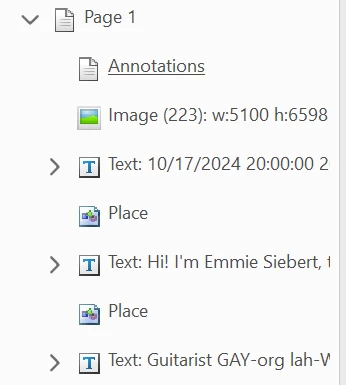
and this for page 2:
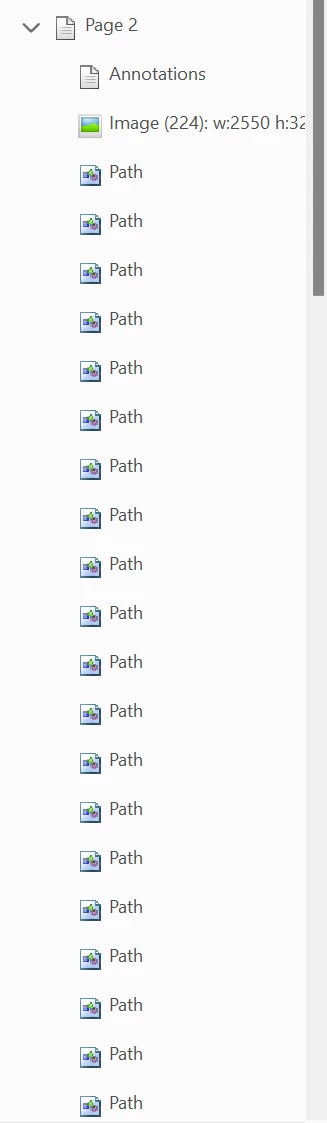
The same behavior occurs in the new Acrobat and the legacy Acrobat.  I am running Acrobat Pro version 2024.003.20180 on Windows 11 23H2.

Any suggestions would be appreciated.

This topic has been closed for replies.

2 replies

try67
Community Expert
Community Expert
October 17, 2024

It doesn't seem like there's any text on that page. Maybe the OCR process failed on it, if the quality scan is poor, for example.

Chuck5D39Author
Participant
October 17, 2024

There is definately text on the page.  Here's partial screen shot.


try67
Community Expert
Community Expert
October 17, 2024

Can you select it one word at a time?

kglad
Community Expert
Community Expert
October 17, 2024

in the future, to find the best place to post your message, use the list here, https://community.adobe.com/

p.s. i don't think the adobe website, and forums in particular, are easy to navigate, so don't spend a lot of time searching that forum list. do your best and we'll move the post (like this one has already been moved) if it helps you get responses.


<"moved from cc desktop">