


Participant
February 2, 2026
Question

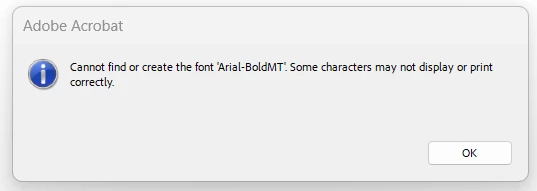
Cannot find or create font 'Arial-BoldMT'. Some characters may not display or print correctly.

  • February 2, 2026
  • 4 replies
  • 1931 views

I have about 8 Acrobat Pro users getting a "Cannot find or create font 'Arial-BoldMT'. Some characters may not display or print correctly." error for multiple different fonts when opening multiple different documents. I have verified that the fonts are installed in Windows Settings, tried deleting font cache in Windows File Explorer, repairing Acrobat, and uninstalling/reinstalling Acrobat. Uninstalling/reinstalling works temporarily, but the issue quickly returns.


    4 replies

    jamesjhone7
    Participant
    February 4, 2026

    It is like an Acrobat font cache or profile issue rather than missing fonts some teams have luck resetting user preferences or checking printer drivers too; annoying stuff like this really breaks flow when you’re just trying to work or download to earn online without constant interruptions.

    JeepD
    Participating Frequently
    February 3, 2026

    Was having the same font issue for a user of ours. 

    While saving the document to PDF/ or printing it to PDF from various sources at some point I saw in the fonts that ‘Arial-BoldMT’ and ‘ArialMT’ (both causing me this issue) were listed as true name under “Helvetica” fonts.

    Downloaded Helvetica fonts, installed, document opens up properly. 

    Not sure if this fix will work for everyone else, or be permanent, but I wager you could try and look up in your control panel, font, check all your fonts and see if Helvetica is in there. If not you’ll have to download it from the web as it’s not one font that comes from Office suite and can’t be found in their cloud fonts. 

    Hope that works out for you.

    JeepD
    Participating Frequently
    February 4, 2026

    Found more information on reddit, seems like clearing appdata folder once in a while or trying to embed the fonts with pre-flight pdf might be the temporary solution. Another suggestion was when you manage to have a PDF that works with the font causing the issue, keep it open and succedent PDF files might open properly. Seems like it’s not the first time Adobe updated version causes that kind of font issues.

    Ron Romine
    Participant
    February 3, 2026

    Does anyone know how Fonts are handled in Acrobat. It shouldn’t be this difficult to understand. Either the Font is there or it’s not. I don’t get it. I have users with the same issue. Close to a 1000 and I hope it doesn’t continue.

    creative explorer
    Community Expert
    Community Expert
    February 2, 2026

    @nate_HBI what happens if you turn off the ‘new Acrobat interface?’ Menu - ‘Disable new Acrobat’ - a restart will be necessary for the changes to be applied. Would you get the same issues. 

    m
    ArbosIT
    Participant
    February 3, 2026

    This helped in my case for my customers PC. 
    I had the problem only in his User Profile, when logged in with local Admin - the problem did not exist.
    In my case it was a failure message with just normal Arial.
    Is there any other solution than to disable new Acrobat?


    creative explorer
    Community Expert
    Community Expert
    February 3, 2026

    @ArbosIT so close but not! Is Arial even used in the document? Sometimes it could be an empty space that is taking it’s spot. If you say OK, does the PDF look fine to you? Sorry, not knowing who created the file, can you or they substitute the font with a different ‘sans serif’ font?

    m