



haeweber
Participant
February 10, 2026
Answered

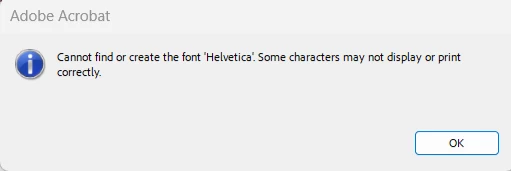
Cannot find or create the font "Helvetica"...

  • February 10, 2026
  • 5 replies
  • 4756 views

Hello!


Recently we have had a user encounter an error when using Adobe Acrobat Pro that states the following:


Cannot find or create the font ‘Helvetica’. Some characters may not display or print correctly.


I have manually ensured that this user has all Helvetica-related fonts installed on their device, and verified that other users are not having this issue when opening this document, so i’m unsure what else to do.  I have also repaired and reinstalled Adobe Acrobat.  Any insight would be greatly appreciated.
 

    Correct answer Anand Sri Bhattacharya

    Hello ​@Wingleader7 


    I hope you are doing well, and thanks for reaching out.


    Acrobat has a separate install and update mechanism, and if you are not able to install the latest build from the Creative Cloud desktop app, close and sign out from the Creative Cloud Desktop app, restart the machine, and try again.

    Launch Acrobat, and check for any pending updates by navigating to Menu > Help> Check for Updates. Install the updates, restart the app and the machine.

    The latest build of Acrobat is Version: 26.001.21563. Planned update, May 18, 2026


    Let us know how it goes.

    Regards,

    Anand Sri


    5 replies

    Wingleader7
    Participant
    May 19, 2026

    That is not the version of Acrobat Pro available in Adobe CC and if you download Acrobat Pro manually, it fails to install saying “You are up to date”.  What’s the real solution to this problem?

    Anand Sri Bhattacharya
    Community Manager
    Community Manager
    May 19, 2026

    Hello ​@Wingleader7 


    I hope you are doing well, and thanks for reaching out.


    Acrobat has a separate install and update mechanism, and if you are not able to install the latest build from the Creative Cloud desktop app, close and sign out from the Creative Cloud Desktop app, restart the machine, and try again.

    Launch Acrobat, and check for any pending updates by navigating to Menu > Help> Check for Updates. Install the updates, restart the app and the machine.

    The latest build of Acrobat is Version: 26.001.21563. Planned update, May 18, 2026


    Let us know how it goes.

    Regards,

    Anand Sri


    Participant
    March 30, 2026

    I have a user with this issue, (except with Arial, which is installed properly) updated to the latest Adobe Acrobat (free) and still have this error.

    Anand Sri Bhattacharya
    Community Manager
    Community Manager
    April 6, 2026

    Hello ​@Terry29895640md36 


    I hope you're doing well. We apologize for the delayed response and the trouble.

    Please ensure you have the latest version of Acrobat installed on the machine: Version: 26.001.21367, Planned update, Apr 02, 2026. Check for any pending updates by navigating to Menu > Help> Check for Updates. Install the updates, restart the app and the machine, and try again.


    Let us know how it goes.

    Regards,

    Anand Sri.

    Participant
    April 9, 2026

    @Anand Sri Bhattacharya, ​@Souvik Sadhu 
    I already have 26.001.21367 installed, yet am having the same issue.  What is extra strange is that this ENTIRE document is all Helvetica, yet some lines/columns are okay and others are not:

    The dotted lines are all supposed to be Helvetica

    Honestly, I don’t really care what sans font is used, but I need something that will work on ANY machine.  I happen to be on a Windows 11 machine.


    Souvik Sadhu
    Legend
    February 13, 2026

    Hi Guys, 


    The latest planned update is now live and includes a fix for the issue. 


    Please update the app to the latest version and share your feedback.


    Regards,

    Souvik

    BW_RWui
    Participant
    February 16, 2026

    On 25.1 and still have the problem.  Creative Cloud says Acrobat Pro is up to date.  Please advise.

    AnandSri
    Legend
    February 17, 2026

    Hello ​@BW_RWui 


    I hope you are doing well. Please install the latest build 25.001.21208. Planned update, Feb 12, 2026, from the Menu of the Acrobat/Reader > Help> Check for Updates. Install the updates, restart the app and the machine, and try again.


    Let us know how it goes.

    Thanks,

    Anand Sri.

    Participant
    February 12, 2026

    I have a user that is also having this same issue.  Another user can open the same file without issue.  What is interesting is I opened one file that opened fine, closed it, and then opened the same file again and got the error.

    It is also somewhat random for the user.  Some PDFs open fine while others give the error message.

    laura_0869
    Participant
    February 12, 2026

    There are several people in our office having the same issue. There are some users that have no problem then others keep getting the error message. 

    trevor_4646
    Participant
    February 11, 2026

    I am experiencing the exact same issue when opening PDF documents within one of our vendor packages. I noticed though if I save the document locally it opens without error’s. The PDF docs that I have tested so far do not use the Helvetica font at all which is quite odd. The adobe reader version is 25.001.21184.0. Any insight on this would help tremendously!

    Souvik Sadhu
    Legend
    February 11, 2026

    Hi ​@haeweber ​@trevor_4646,


    Our team is aware of the issue and has been working on it.


    The fix should be live with the upcoming planned update.


    We request your kind understanding and patience while the fix is released.


    Regards,

    Souvik

    laura_0869
    Participant
    February 12, 2026

    When is the upcoming planned update?
