
Participating Frequently
November 3, 2023
Answered

Cannot format fields in forms

  • November 3, 2023
  • 2 replies
  • 888 views

I am trying to convert a text box into a date box with being able to select a date from a calendar. I enter the Properties panel, but I am not getting the Format tab like I am used to. What am I doing wrong? Is there another way to do this? Thanks.
This topic has been closed for replies.
Correct answer Thom Parker

The form is probably setup as an Adobe Sign form. Convert it to a regular PDF form.


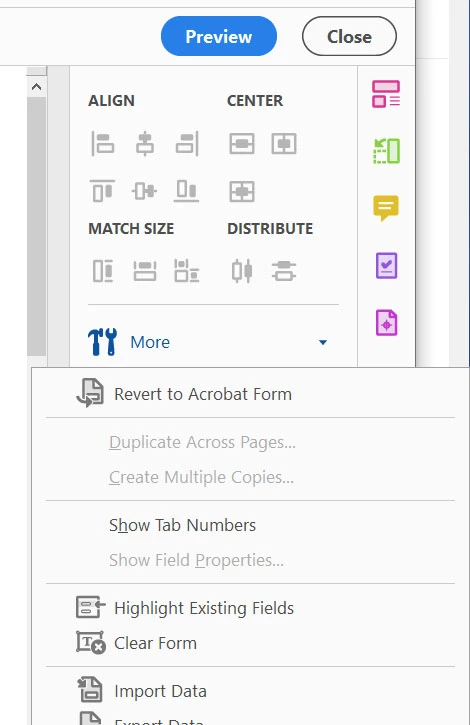
Open the "Prepare Form" tools and select "Revert to AcroForm" from the "More.." menu on the right side of the window. 


2 replies

Participating Frequently
November 3, 2023

Just as a better look at what I am doing, this is a screenshot of my Text Field Properties box:


As you can see, I am only getting four tabs, which does not include Format.

I am using 2023.006.20360, which is the latest release with a Creative Cloud account.

Thom Parker
Community Expert
Community Expert
November 3, 2023

That screen show conclusively shows the form is setup as an Adobe Sign form.


Thom Parker - Software Developer at PDFScriptingUse the Acrobat JavaScript Reference early and often
Thom Parker
Community Expert
Thom ParkerCommunity ExpertCorrect answer
Community Expert
November 3, 2023

The form is probably setup as an Adobe Sign form. Convert it to a regular PDF form.


Open the "Prepare Form" tools and select "Revert to AcroForm" from the "More.." menu on the right side of the window. 


Thom Parker - Software Developer at PDFScriptingUse the Acrobat JavaScript Reference early and often
Participating Frequently
November 3, 2023

Thanks, Thom. That did it!