
Question
...cannot open the image editing
Adobe Acrobat Pro, continuous release version 2022.003.20314 64-bit running on Windows 11.
When editing a PDF, if I right-click on an image (a jpg in this case) then "Edit Using" then "Adobe Photoshop" I receive an error:
Adobe Acrobat cannot statt the image editing application you've specified. Verify the image editing application location on the Content Editing panel in Preferences.The path to Photoshop.exe is correct:
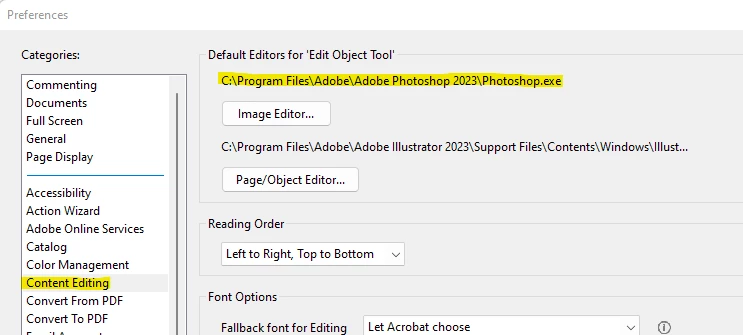
I also tried right-clicking the object then "Edit Using" and "Open With" then navigating to the path to the Photoshop executable. I get the same error.
Furthermore, I already have file associations for JPEG, PNG, etc in the Windows system set to that executable so Acrobat doesn't even need the path; it just needs to "open" the file with the system default editor.
 AdChoices