
Participant
February 21, 2024
Question

Cannot Print Chinese words when Run whether user is logged on or not

  • February 21, 2024
  • 2 replies
  • 589 views

Adobe Acrobat (64-bit) Version 23.008.20533

Microsoft Windows 11  Pro

We are using the Adobe PDF printer to print PDF file by a vb exe program.  It can print PDF file with Chinese word successfully for normal case. However, it cannot print the Chinese word when using window schedule task in the  Security options "Run whether user is logged on or not".
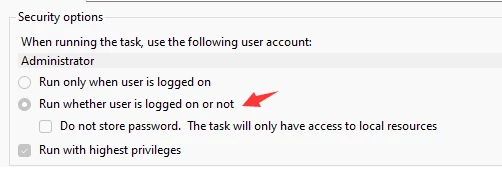
Cannot print Chinese words when select "Run whether user is logged on or not".

Can print Chinese words in normal case.

Adobe PDF Printing Preferences Setting.
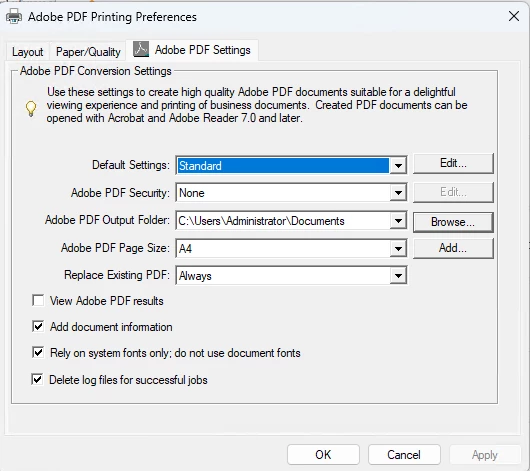
 

How to print the Chinese words using by Adobe PDF printer when whether user is logged on or not?

This topic has been closed for replies.

2 replies

Amal.
Legend
February 21, 2024

Hi there


Hope you are doing well and thanks for reaching out.


Please go through the correct answer marked in the similar discussion https://community.adobe.com/t5/acrobat-reader-discussions/how-to-print-pdf-by-acrobat-reader-using-scheduled-task/m-p/10650073#M58698 and see if that works.


~Amal

kglad
Community Expert
Community Expert
February 21, 2024

in the future, to find the best place to post your message, use the list here, https://community.adobe.com/

p.s. i don't think the adobe website, and forums in particular, are easy to navigate, so don't spend a lot of time searching that forum list. do your best and we'll move the post (like this one has already been moved) if it helps you get responses.


<"moved from cc desktop bugs">