Inspiring
October 2, 2017
Answered

Cannot see data in form fields unless field is selected (not Apple Preview caused)

  • October 2, 2017
  • 3 replies
  • 879 views

I realize this issue has been asked and answered many times but I feel my situation is different.

I cannot see data in form fields unless field is selected same as: https://forums.adobe.com/thread/1126981.

I've created the form myself on Win8 using Adobe Acrobat Pro XI.

This form has only been used on my computer so this is not an Apple Preview related issue though the experience seems to be the same.

I suspect I may have used the "preview" function after creating the form fields in Adobe Acrobat Pro, would this result in the same issue with form fields?
This topic has been closed for replies.
Correct answer BigWinnie

So I think I have the answer to this issue.

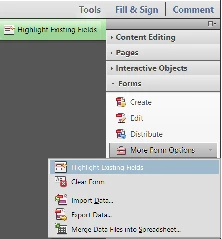
I've been repeatedly able to isolate the need, when viewing the editable form to deselect the setting "Highlight Existing Fields".

When this setting is selected, I appear to consistently have the incorrect behaviour. When I have it deselected I appear to consistently have the correct behaviour.

I hope this can help others that may face this issue.

Please don't though ask me to help solve this or similar for you as I'm a novice with PDF documents.

Instead, like me, create a new post into this forum for others more capable than I to assist you.

3 replies

BigWinnieAuthorCorrect answer
Inspiring
October 3, 2017

So I think I have the answer to this issue.

I've been repeatedly able to isolate the need, when viewing the editable form to deselect the setting "Highlight Existing Fields".

When this setting is selected, I appear to consistently have the incorrect behaviour. When I have it deselected I appear to consistently have the correct behaviour.

I hope this can help others that may face this issue.

Please don't though ask me to help solve this or similar for you as I'm a novice with PDF documents.

Instead, like me, create a new post into this forum for others more capable than I to assist you.

BigWinnieAuthor
Inspiring
October 3, 2017

Now this really bothers me and I'm a 20 yr career IT veteran.

I've been editing new versions of this same document, and the document version I was going to create a video with, not modified since I've created the original  post, is now displaying the data correctly and not displaying the incorrect form field behaviour so there is no point creating the video.

Anyone else had similar experiences where one minute the document misbehaves and the next it works just fine, and no modifications to the document have been made?

Now my challenge is the newer version that I've created has the data in the text fields turned 90 degrees and I cannot get it back. Hmm,maybe another version of the form is due me thinks.

Bernd Alheit
Community Expert
Community Expert
October 2, 2017

Can you share the form?

BigWinnieAuthor
Inspiring
October 2, 2017

Unfortunately I cannot share the form as this belongs to a customer. What I will do is video parts of the form to demonstrate the experience.

I am wondering if there are others who've had the same experience on MS Windows without being inflicted with Apple Preview issue, and how they have resolved it? Am I limited in options to only recreating the form from scratch?

I've tried the process of changing form field properties; no luck.

I cannot apply the javascript fix I've seen on this issue to customer's PC's, so I'm limited to correcting the issue with the PDF document.

I've gone through the process of recreating the form from scratch at least 4 times and have now 16 versions each time trying different things in the attempt to correct the problem. I'm now on my 5th time recreating the form.

Could there be other things in the form, other existing objects like comment text fields, that can cause this issue?