Participant
October 22, 2025
Answered

Cannot Share PdF Links - my fault

  • October 22, 2025
  • 1 reply
  • 106 views

This is silly but a while ago i went to share a pdf via link and a pop up came up asking if i would allow something (i cannot remmeber what it said) and i quickly said do not allow, on instinct. I had never gotten that pop up before so i was not thinking and clicked don't allow and now i cannot share links. I have searched and searched in the preferneces to try and undo what i had selected but cannot find anything. Any help?? Thank you!!

Correct answer creative explorer

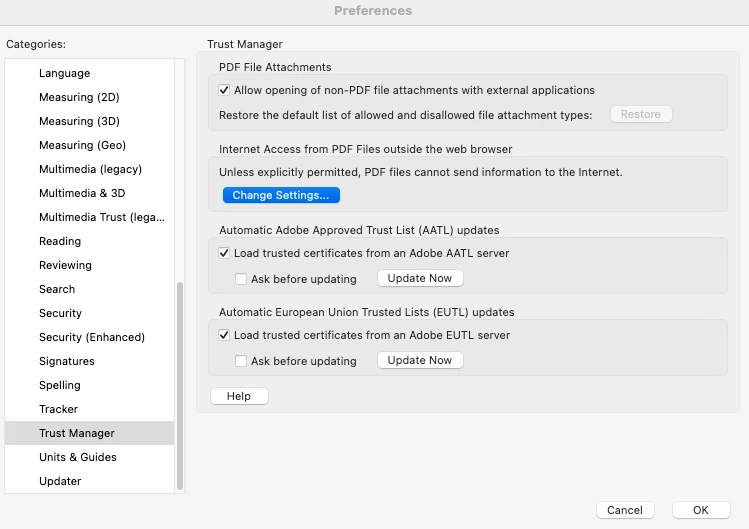
@mackenzie_6285 I wonder if it can be a couple of things, the security permissions for web access? Command K (MAC) or Control K (PC) keyboard shrtcut for Preferences. Trust Manager. Change Settings. Look at the setting, setting is not set to "Block PDF Files' Access To All Web Sites". It should ideally be "Allow PDF Files To Access All Web Sites" or "Always Ask" if you prefer to be prompted for other files.


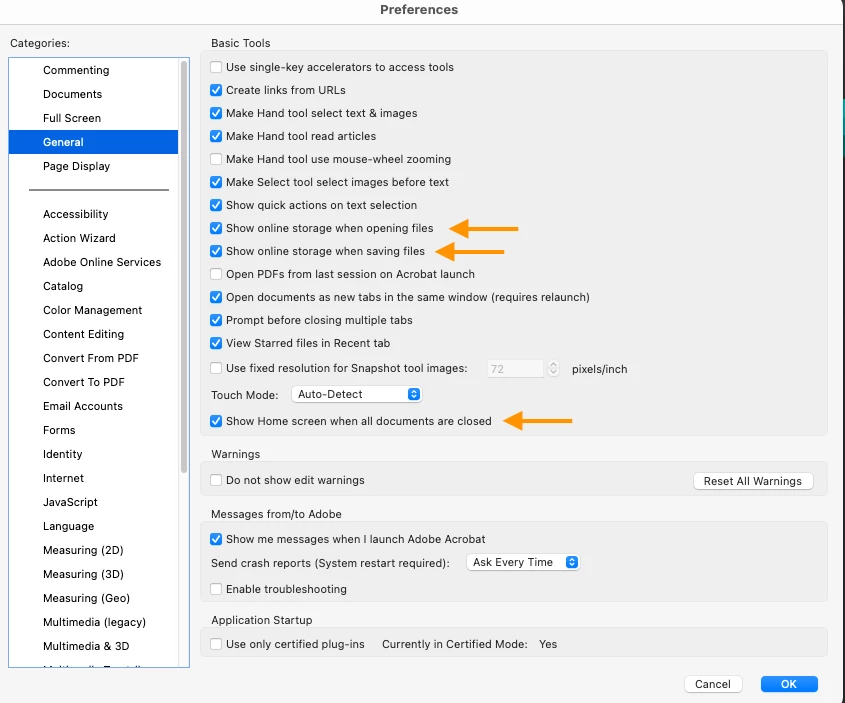
Also, depending on your version pf Acrobat or OS, in the Preferences window, look for the Category called General or Online Services (if available). In the main panel for that category, look for a checkbox or setting related to:


• Show online storage when opening files

• Enable services/Document Cloud services

• Show Home Screen online services

• Disable all Document Cloud services" (Make sure this is UNCHECKED)

Click OK and then restart Acrobat.


1 reply

creative explorer
Community Expert
creative explorerCommunity ExpertCorrect answer
Community Expert
October 22, 2025

@mackenzie_6285 I wonder if it can be a couple of things, the security permissions for web access? Command K (MAC) or Control K (PC) keyboard shrtcut for Preferences. Trust Manager. Change Settings. Look at the setting, setting is not set to "Block PDF Files' Access To All Web Sites". It should ideally be "Allow PDF Files To Access All Web Sites" or "Always Ask" if you prefer to be prompted for other files.


Also, depending on your version pf Acrobat or OS, in the Preferences window, look for the Category called General or Online Services (if available). In the main panel for that category, look for a checkbox or setting related to:


• Show online storage when opening files

• Enable services/Document Cloud services

• Show Home Screen online services

• Disable all Document Cloud services" (Make sure this is UNCHECKED)

Click OK and then restart Acrobat.


m
Participant
October 24, 2025

Hi Thank you so much!! It was the first solution - opening trust manager and clikcing all to access all websites.