


Inspiring
March 27, 2026
Question

Certain letter in Adobe Fonts are not displaying correctly

  • March 27, 2026
  • 2 replies
  • 57 views

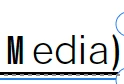
As I’ve been using Adobe applications I am getting an issue where one or two letters of an Adobe font are not showing up properly. This has been prevalent in Acrobat and Premiere. The attached image was using the default Adobe Sans MM font in Acrobat and the M is not showing up properly and when I try to add more letters they do not show up properly either. It automatically switches to Minion. Does anyone know what is going on?

Thanks!
 

    2 replies

    jane-e
    Community Expert
    Community Expert
    March 27, 2026

    @JesseMS42 


    Multiple Master (MM) fonts, which are a type of Adobe PostScript Type 1 font, are deprecated.


    “Type 1 fonts (also known as PostScript, PS1, T1, Adobe Type 1, Multiple Master, or MM) are a format within the font industry that has been replaced by formats that can support larger glyph sets.”

    https://helpx.adobe.com/fonts/kb/postscript-type-1-fonts-end-of-support.html


    Jane


    Eric Dumas
    Community Expert
    Community Expert
    March 27, 2026

    Hi,

    Just to make sure we understand our issue. Can ou confirm the steps ou took to get to this issue?

    • Open a pdf
    • Edit the pdf
    • Type text using the font that ou stated

    Also, it is always helpful to confirm the exact version of our OS and application. 

    Can you include a screenshot of- the Properties Panel > Fonts

    JesseMS42Author
    Inspiring
    March 27, 2026

    Thank you!

    Yes that is exactly what I did. I am using the latest version of all Adobe Apps and I am on Tahoe  26.4

    jane-e
    Community Expert
    Community Expert
    March 27, 2026
