

FozzieBear
Known Participant
December 13, 2024
Question

Certificate error when opening a document in Adobe Reader

  • December 13, 2024
  • 1 reply
  • 715 views

We host a small jpeg image on Microsoft OneDrive which is used as a logo for invoices in a booking system web application. When we open one of the documents within the application which contain this image in Adobe Acrobat Reader DC to print it, we get the error message in the image below "Select a certificate to authenticate yourself to s2s-api-onedrive.com:443"
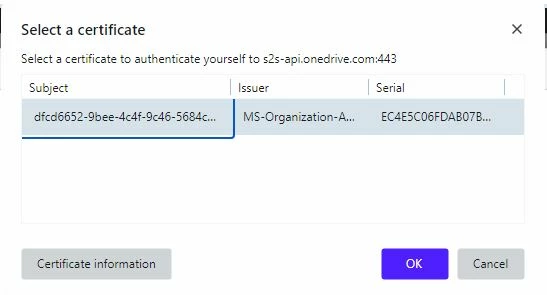
 

This has only started happening in the last few months. If you select OK the message goes away. I dont know if this is an Adobe issue or Microsoft issue. Can anyone suggest a fix please?

This topic has been closed for replies.

1 reply

Souvik Sadhu
Legend
December 14, 2024

Hi @FozzieBear,


Hope you are doing well. Thanks for writing in!


I found this issue on Microsoft Forums and looks like this is related to Microsoft Authentication through web browsers. You might want to try this:

Create the following registry key either in Start Menu-> Registry Editor:


CURRENT_USER or LOCAL_MACHINE: This will stop you from manually selecting a user certificate for authentication.

  • Type : REG_SZ

  • Name : 1 (or any following number if you already have parameters configured here)

  • Location :

    • User setting: HKEY_CURRENT_USER\SOFTWARE\Policies\Microsoft\Edge\AutoSelectCertificateForUrls
      OR

    • Device setting: HKEY_LOCAL_MACHINE\SOFTWARE\Policies\Microsoft\Edge\AutoSelectCertificateForUrls

  • Value : {"pattern":"https://adobe.ly/4ixyxlH","filter":{"ISSUER":{"CN":"AZURE-CA"}}}


#Replace AZURE-CA by the CN/name of your issuing CA.

Ref: Microsoft Edge Browser Policy Documentation | Microsoft Learn.


Link to the entire thread here: Prompt for select a certtificate to authenticate yourself to - Microsoft Community


Hope this helps.


-Souvik

FozzieBear
Known Participant
December 14, 2024

Many thanks @S. S  for the reply and the link to the microsoft forum post. I will try this method and see if it resolves the issue.

Souvik Sadhu
Legend
December 14, 2024

Sure @FozzieBear!


I'll be on standby in case you need further assistance.


-Souvik