Participant
July 4, 2022
Answered

change 150 dpi

  • July 4, 2022
  • 2 replies
  • 1607 views

How to convert to 150dpi and keep layers in a 300dpi PDF file?

This topic has been closed for replies.
Correct answer Brad @ Roaring Mouse

A few ways.. (Assuming you already have layers). Here are Two:

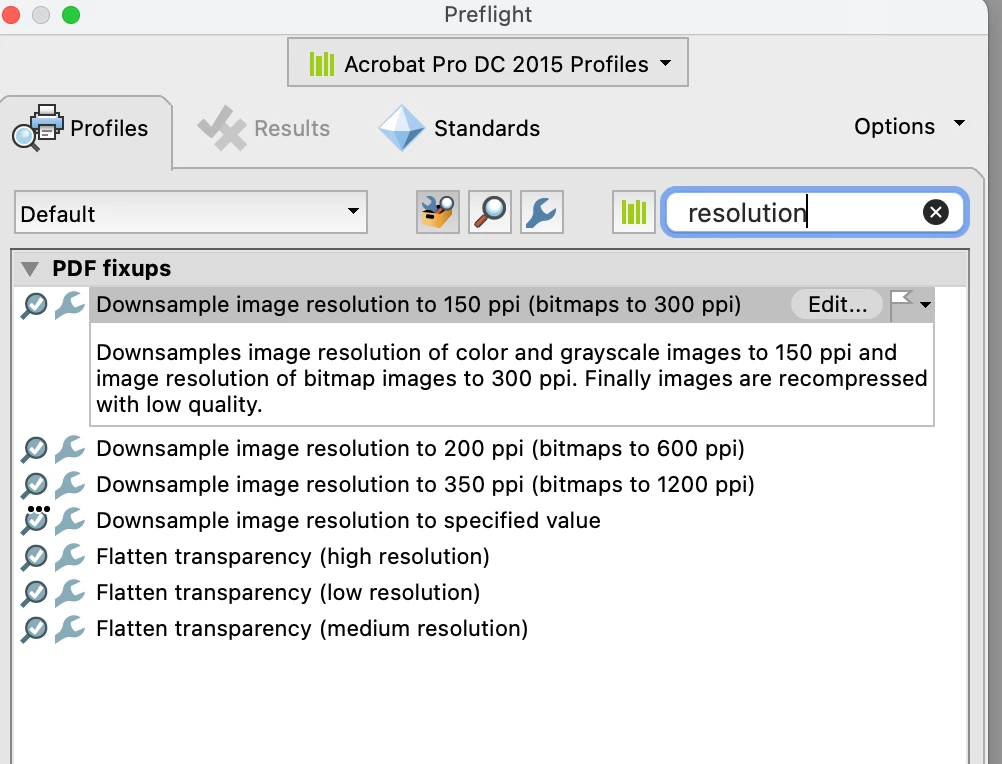
You can apply a Preflight Fixit to do the downsampling for you. There's a built-in one to do exactly what you want.
OR

you could simply Save As Other > Optimized PDF and select a setting to resample your images to 150 for any image over 150.

Neither should affect the layering at all.

2 replies

Abambo
Community Expert
Community Expert
July 4, 2022
You can only influence the size/quality of image types (colour, grey, bitmap) but not certain images only.

Abambo
via mobile phone.
ABAMBO | Hard- and Software Engineer | Photographer
Brad @ Roaring Mouse
Community Expert
Brad @ Roaring MouseCommunity ExpertCorrect answer
Community Expert
July 4, 2022

A few ways.. (Assuming you already have layers). Here are Two:

You can apply a Preflight Fixit to do the downsampling for you. There's a built-in one to do exactly what you want.

OR

you could simply Save As Other > Optimized PDF and select a setting to resample your images to 150 for any image over 150.

Neither should affect the layering at all.

mj.walkerAuthor
Participant
July 4, 2022

Apply a Preflight Fixit is OK


Thank you