Participant
July 16, 2021
Answered

Changing a PDF from 8.5 x 8.5 inches to 6.875 x 6.875 inches

  • July 16, 2021
  • 1 reply
  • 887 views

Why is this such a hardship in 2021? I have a document. I love it. It is perfect. I want to do one thing... CHANGE THE SIZE OF THE PAGES FROM 8.5 INCHES SQUARE to 6.875 INCHES SQUARE.


I have spent so many hours on this. Why can't Acrobat JUST DO IT?!?!
This topic has been closed for replies.
Correct answer Amal.

Hi there


Hope you are doing well and sorry for the trouble. As described yo want to change the page size of the PDF file.


If you are on Mac OS, please checkout the steps shared in the help page https://helpx.adobe.com/acrobat/kb/Change-PDF-page-size-in-MAC.html


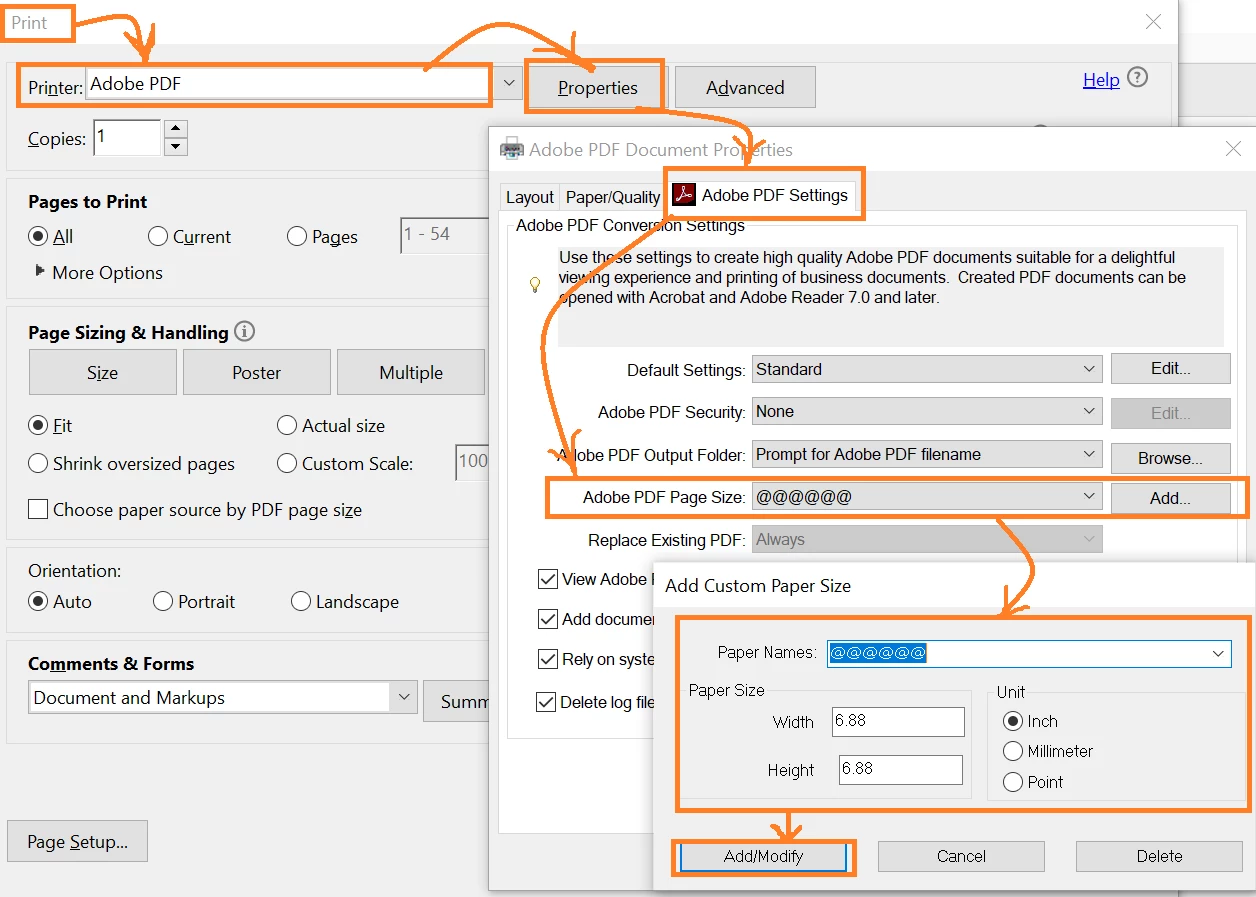
For Windows OS, please try the steps below:


  1. Open the PDF file in Adobe Acrobat Pro DC.
  2. Go to Print and select Adobe PDF in the printer list.
  3. Go to Properties > Adobe PDF page Size > Click Add > Provide paper name , and paper size select unit > click Add/Modify > Click OK.


Regards

Amal

1 reply

Amal.
Amal.Correct answer
Legend
July 16, 2021

Hi there


Hope you are doing well and sorry for the trouble. As described yo want to change the page size of the PDF file.


If you are on Mac OS, please checkout the steps shared in the help page https://helpx.adobe.com/acrobat/kb/Change-PDF-page-size-in-MAC.html


For Windows OS, please try the steps below:


  1. Open the PDF file in Adobe Acrobat Pro DC.
  2. Go to Print and select Adobe PDF in the printer list.
  3. Go to Properties > Adobe PDF page Size > Click Add > Provide paper name , and paper size select unit > click Add/Modify > Click OK.


Regards

Amal

try67
Community Expert
Community Expert
July 16, 2021

The first option is the better one, on both platforms. The second option requires "re-frying" the file, which is never a good idea if it can be avoided.