
Participant
February 14, 2025
Question

Changing language on fillable form error messages.

  • February 14, 2025
  • 3 replies
  • 263 views

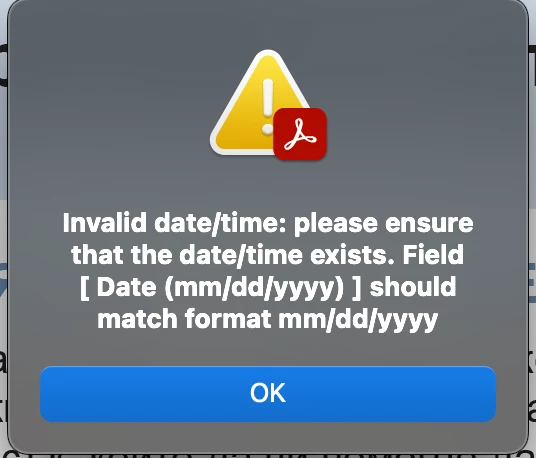
How do i change the language on error messages? The form is translated from an english version. I have tried changing the language field in the document properties to the preferred language yet the error messages still populate in english.
3 replies

JR Boulay
Community Expert
Community Expert
February 15, 2025

" it uses the UI language of the application, not of the document"

Yes, I can confirm that. It's something I use a lot.


For personalized alerts, you can only rely on the application settings:


if (app.language == "FRA") // if app language is French
{var textAlert = "Bonjour !";}
else
{var textAlert = "Hello!";}

app.alert(textAlert);


Acrobate du PDF, InDesigner et Photoshopographe
try67
Community Expert
Community Expert
February 15, 2025

I believe it uses the UI language of the application, not of the document. If you want to have full control over it then you'll need to write your own validation and format scripts to do it, instead of relying on the built-in Date format setting.

creative explorer
Community Expert
Community Expert
February 15, 2025

@curtis_7372 right off the bat, I think this means the date you entered in the form field is not in the correct format (month/day/year) or is not a valid date. The error message itself tells you the correct format: mm/dd/yyyy. If the month or day is a single digit, add a leading zero (e.g., 03/08/2024).

m