
fugrosupportadobe
Participating Frequently
September 4, 2014
Answered

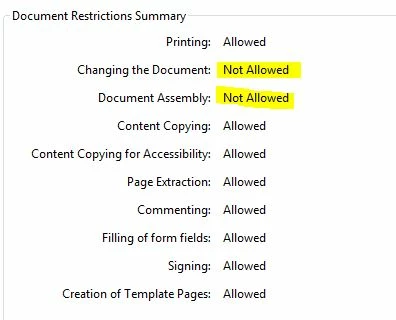
Changing The Document: Not Allowed

  • September 4, 2014
  • 11 replies
  • 72206 views

Hi,

Anyone who can help us on our issue regarding with the files created using Acrobat 7.

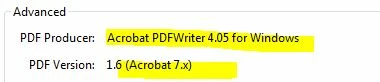
When we open the files using higher versions the Changing the Documents and Document Assembly always marked as Not Allowed but when we open it using Acrobat 7 all settings are Allowed. tried this in few computers running Acrobat 7 with same results.
This topic has been closed for replies.
Correct answer ygv7654

Hi, I just came across this forum because I was having the same problem. I eventually figured out a solution that worked for me, so I thought I would post it here if it might help someone. I have Adobe XI Pro and was not able to edit a document that had no security settings made by Adobe 7, I kept getting the message that it was signed. I went to Tools>Forms>Edit Form, and I got an error saying the document was signed, but it also asked me if I wanted to save a copy, so I did. Then I was able to edit the copy just fine. I had tried the "save as" option before that and it did not work, so it seems that 'saving a copy' and 'save as' are not the same. There may be another way to save a copy, but that's the solution I came across.

11 replies

Inspiring
September 4, 2014

The not allowed would indicate the file was created with security set or possibly is a PDF/A file. The /A is an archive format that does not allow changes and you would have to remove the /A with preflight if that is the case. For the security settings, you can check the document properties under the security tab. There is also usually a little gold key on the screen when secured. The original creator is old (looks like from AA4) and may have been edited in a later version to get the version level.

Legend
September 4, 2014

What are you opening in

- Acrobat Standard

- Acrobat Pro

- Adobe Reader

?