Participant
November 24, 2024
Answered

Character Spacing between numbers

  • November 24, 2024
  • 1 reply
  • 472 views

Hello,

I am creating a PDF form. I would like a space to be automatically created between numbers when filling in the form. There are fields that look something like this


Postcode: |    |    |    |     |
Postcode: ‘1 | 2 | 3 | 4 | 5’


To do this, I need to make the distance from 12345 approximately 1 2 3 4 5. I have not yet found a function with which this is possible?


With a normal field, the user writes the numbers in the distance separators.

Regards
This topic has been closed for replies.
Correct answer try67

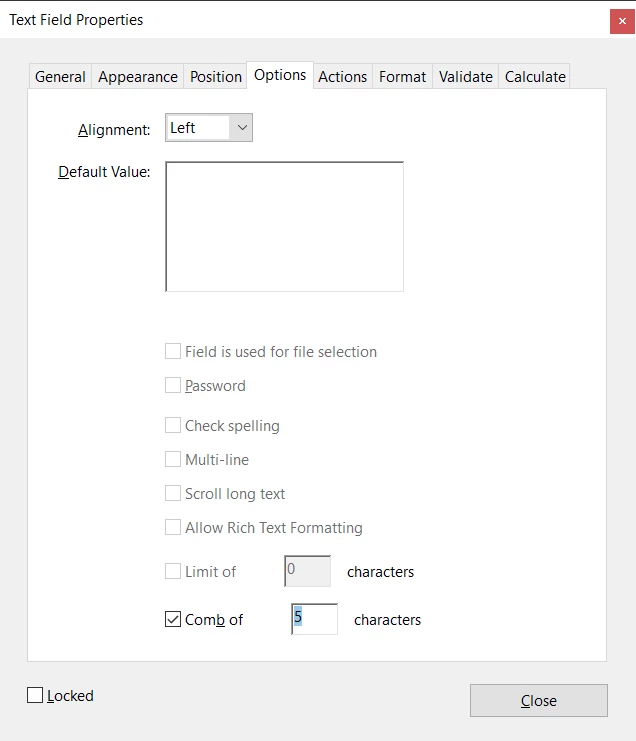
Go to the field's Properties and under the Options tab and tick the check-box next to "Comb of ... characters" and enter 5 as the number of characters:


(if the box is not enabled make sure to untick all the other ones first)


1 reply

try67
Community Expert
try67Community ExpertCorrect answer
Community Expert
November 24, 2024

Go to the field's Properties and under the Options tab and tick the check-box next to "Comb of ... characters" and enter 5 as the number of characters:


(if the box is not enabled make sure to untick all the other ones first)