
Characters all garbled in pdf (Safari-related?)
I recently switched from Adobe CS6 to Adobe CC. I typeset a journal published online as pdf files and before the switch there were no problems with the files. Now that the first issue was published, I have been contacted by several readers that the files are unreadable and unprintable as the letters are all garbled, some have smileys, some squares, some simply missing letters. The browser that causes the problem (that I know of at least) is Safari. That is also the case with my mac (10.12.4): in Chrome everything appears to be well but in my desktop Safari (10.1) not, instead in my iPad it reads just fine. No problems with PCs, at least none I know of. When I download the garbled pdf on the desktop, it appears to be fine. The pdf's are published in PHP's Open Journal System, but I don't think that's the where the problem lies as it's all garbled letters also in pdfs sent via email and opened in Safari.
I make the files in InDesign and export them with High Quality preset (tried also PDF/A, same result).
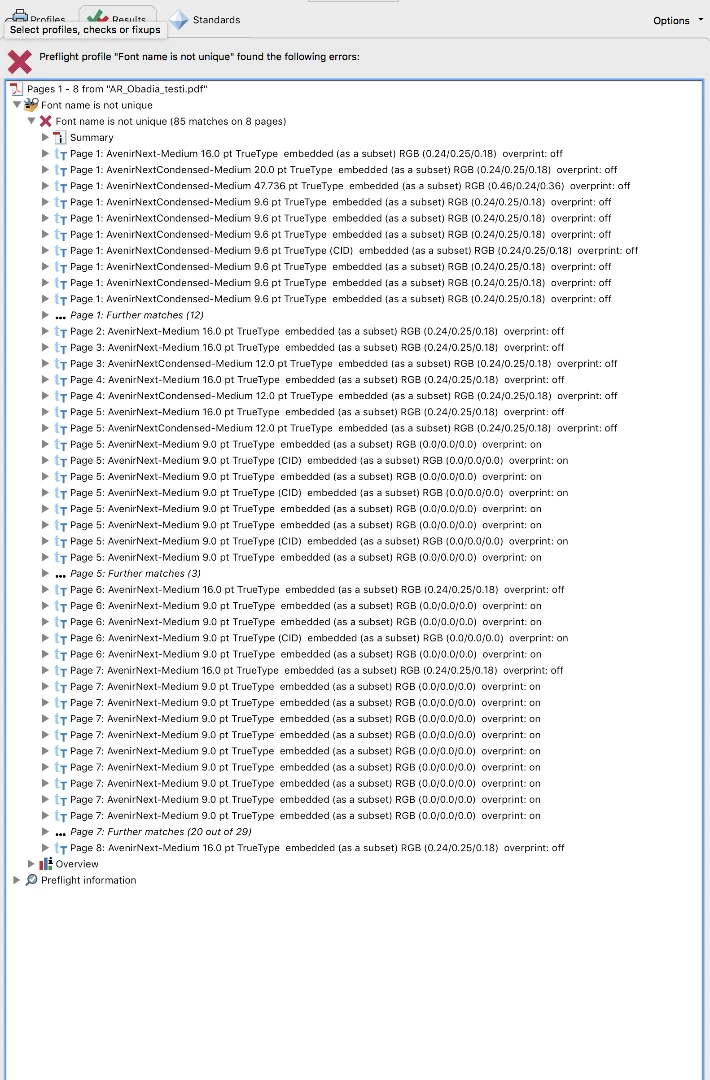
The only difference in typesetting since updating to CC is that one particular font I've used is no longer available to me. It is not included in the Typekit so I have changed that font into Avenir Next and Avenir Next Condensed by replacing the missing font everywhere it has occurred. In trying to detect where the problem might be, I have preflighted the pdfs and apparently, for some reason I just don't get, the font-preflight says that the font name Avenir Medium is not unique (below). For some reason all occurrences of Avenir Next Medium are separate fonts. That is, all those bits that were previous in the font that is no longer available to me.
I don't know if this is the source of the problem, but it's the only where there seems to be a problem. Is there a way to fix this?
Or is the problem Safari-related? If it is, how could that be fixed?
I will greatly appreciate any help you can give to me. I have struggled with this since Thursday and just haven't managed to figure it out. Perhaps I haven't been looking into the right place in trying to detect the problem.
 AdChoices