Participating Frequently
July 29, 2021
Answered

Check box if Child is 10 or Older

  • July 29, 2021
  • 2 replies
  • 673 views

I am working in Acrobat DC and I have a field for a child’s date of birth, ChildDOB. Later in the form I have a field, Age, that calculates the child’s age (see below). Later yet in the form I have a check box, CBOver10, that I want to have automatically checked if the child is 10 years of age or older and of course remain unchecked if the child is 9 years of age or younger.


This is my coding for the Age field.


var dob = util.scand("mm/dd/yyyy", this.getField("ChildDOB").valueAsString);

if (dob != null) {

   var today = new Date();

   var age = today.getFullYear() - dob.getFullYear();

   var m = today.getMonth() - dob.getMonth();

   if (m < 0 || (m === 0 && today.getDate() < dob.getDate())) {

       age--;

   }      

   event.value = age;

}

else {

   event.value = "";

}


I’m not sure how to and what the coding would be to have CBOver10 checked automatically if the child is 10 years of age or older.


Thanks for your help.
This topic has been closed for replies.
Correct answer Nesa Nurani

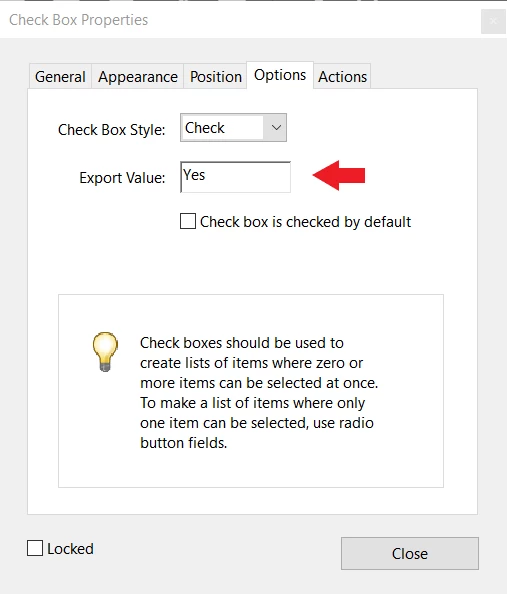
Go to checkbox properties and under 'options' tab check that export value is set to "Yes" (which is by default, if you set it to something else change it in script from "Yes" to value you set, See photo bellow).

Put this script in "Age" field under validation tab as "Run custom validation script":

this.getField("CBOver10").value = event.value >= 10 ? "Yes" : "Off";


2 replies

try67
Community Expert
Community Expert
September 2, 2021

Just be aware this code will only execute when you change the value of some field in the file.

If you filled in the DOB field when the child is 8 and open it two years later, it will not update to show that they are now 10. In order to do that you would need to place the script at the doc-level, so that it runs each time the document is opened.

If you do that you'll need to change all instances of

event.value =...

To:

this.getField("Age").value =

Jamie5EA9Author
Participating Frequently
September 2, 2021

Thank you so much for the information try67. I will keep this in mind. I actually hadn't thought about that, very good to know. Thanks a bunch!

Nesa Nurani
Community Expert
Nesa NuraniCommunity ExpertCorrect answer
Community Expert
July 30, 2021

Go to checkbox properties and under 'options' tab check that export value is set to "Yes" (which is by default, if you set it to something else change it in script from "Yes" to value you set, See photo bellow).

Put this script in "Age" field under validation tab as "Run custom validation script":

this.getField("CBOver10").value = event.value >= 10 ? "Yes" : "Off";


Jamie5EA9Author
Participating Frequently
September 2, 2021

Sorry for the late reply. This works great, thank you!!