Inspiring
February 4, 2022
Question

Check boxes tagging structure

  • February 4, 2022
  • 2 replies
  • 2157 views

Hey all!


Can someone tell me how the taging structure for checkboxes should look like to comply for accessibility and screen readers?

I know how to create the check box (name them the same and make the export value different) and that the form field needs to be nested within each <P> tag.

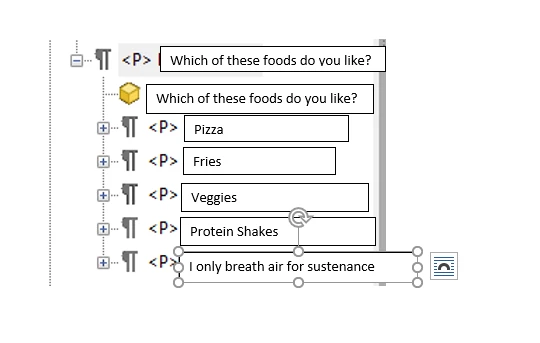
Should the question (What food do you like), and all the answers (Pizza, Fries, Veggies,...) all be on the same level of the tagging structure,
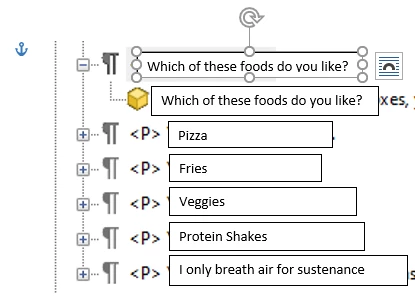
 

or should all the answers be nested within the question?
Thanks for your help!!

Yes I know I misspelled "breathe"


This topic has been closed for replies.

2 replies

Bevi Chagnon - PubCom.com
Legend
February 4, 2022
quote

I know how to create the check box (name them the same and make the export value different)


No, you described radio buttons — name them the same. Radio buttons allow for only 1 choice, excluding the others in the same-named group.


If you want truly independent check boxes where the user can select one or more options, then they are just plain checkbox fields.


quote

... and that the form field needs to be nested within each <P> tag.

Yes, that's correct.


quote

Should the question (What food do you like), and all the answers (Pizza, Fries, Veggies,...) all be on the same level of the tagging structure,


or should all the answers be nested within the question?


Either construct works at this time. But note that:


You can't nest a <P> inside another <P>, so when you have the answers nested in the same <P> as the question, they will be just yellow content boxes and <Form> tags with the question's <P>.


You can also nest each answer/label and its <Form> tag within a <Div>, and then nest the <Div> inside the <P>.


|&nbsp;&nbsp;&nbsp;&nbsp;Bevi Chagnon &nbsp;&nbsp;|&nbsp;&nbsp;Designer, Trainer, &amp; Technologist for Accessible Documents ||&nbsp;&nbsp;&nbsp;&nbsp;PubCom |&nbsp;&nbsp;&nbsp;&nbsp;Classes &amp; Books for Accessible InDesign, PDFs &amp; MS Office |
CyndyB836Author
Inspiring
February 4, 2022

What would be the benefit of using the <Div> tags nested in the question <P>>, rather than putting each answer on the same level (not nested)


Does it work better for the screen readers?

CyndyB836Author
Inspiring
February 4, 2022

Yup! I also see that the subject should be Tagging structure for checkboxes - Sorry! I'm tired!!