karthick
Participant
December 13, 2025
Answered

Checkbox enable and disable

  • December 13, 2025
  • 1 reply
  • 330 views

I need a PDF script based on the concept. Could you please help?


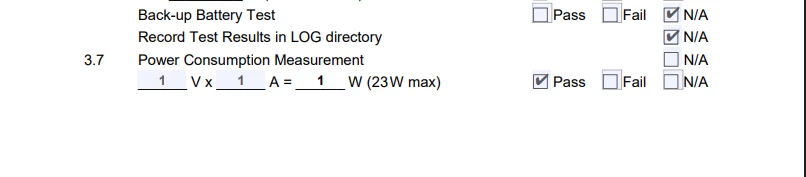
can not write N/A in section 3.7 and also write PASS or FAIL
if section 3.7 is N/A than below fields are not enables
if section 3.7 is PASS than upper line should not be enabled (see snapshot)


Screenshot 2025-12-11 185325.png

Correct answer Nesa Nurani

If C35 is checked, C36 (pass) and C36 (Fail) should be disabled. C36(NA) should be enabled.

If C35 is unchecked, C36 (pass) and C36 (Fail) should be enabled. C36(NA) should be disabled.


You cannot set the readonly property on individual options of mutually exclusive checkboxes.

If you need per-option control, you have few viable approaches:

1. Give each checkbox a unique field name.
This allows readonly to be applied individually, but it breaks the mutually exclusive behavior, which then must be enforced with additional scripting.

2. Use scripting to display or hide specific checkboxes.
Instead of readonly, use the display property (display.visible or display.hidden), which does work at the widget level while preserving mutual exclusivity.

To test display property as Mouse Up action of checkbox C35 use this:

if (event.target.value !== "Off") {
 this.getField("C36.0").display = display.hidden;
 this.getField("C36.1").display = display.hidden;
 this.getField("C36.2").display = display.visible;} 
else {
 this.getField("C36.0").display = display.visible;
 this.getField("C36.1").display = display.visible;
 this.getField("C36.2").display = display.hidden;}




1 reply

Nesa Nurani
Community Expert
Community Expert
December 14, 2025

You can achieve this by adding a Mouse Up action to the Fail checkbox. For example:

if(event.target.value !== "Off"){
 this.getField("Check Box2").readonly = true;
 this.getField("Check Box3").readonly = true;
 this.getField("Check Box4").readonly = true;}

This will set the specified fields to read-only when the Fail checkbox is selected.

To provide more accurate assistance or tailor the script to your setup, please share the exact field names of all checkboxes (or other fields) that should be affected.

karthick
karthickAuthor
Participant
December 14, 2025

Hi Nesa, Thanks for your help.

The checkbox name is the same, but the value is unique.

Here you can see the field names:

karthick_0-1765698012914.png


Nesa Nurani
Community Expert
Community Expert
December 14, 2025

Can you explain exactly which fields should be enabled/disabled and when?
