Participant
June 27, 2020
Answered

Checking box checks a second and hides a third

  • June 27, 2020
  • 1 reply
  • 906 views

Hi all,


I'm a complete novice, so this is probably really simple, but I cannot find a similar problem listed.


I'm creating a form where if the user, prior to sending to a client, checks the NoFee box this will hide CardYes but check CardNo.


However, if the NoFee box is not checked, CardYes becomes shown (and this is then a required field) and CardNo is hidden.


Can anyone help me?

This topic has been closed for replies.
Correct answer ls_rbls

I will answer your question  using the JavaScript example the Max Wyss posted in the following  thread a long while ago: https://answers.acrobatusers.com/show-hide-multiple-fields-based-on-a-check-box-and-then-make-them-show-again-q299956.aspx


You need a mouse up action javascript in the "Nofee" checkbox.


In edit mode, right-click on that checkbox field select Properties from the context menu.


This will open the Checkbox Properties dialogue box where you will then click on the "Actions" tab.


Follow the slide below:
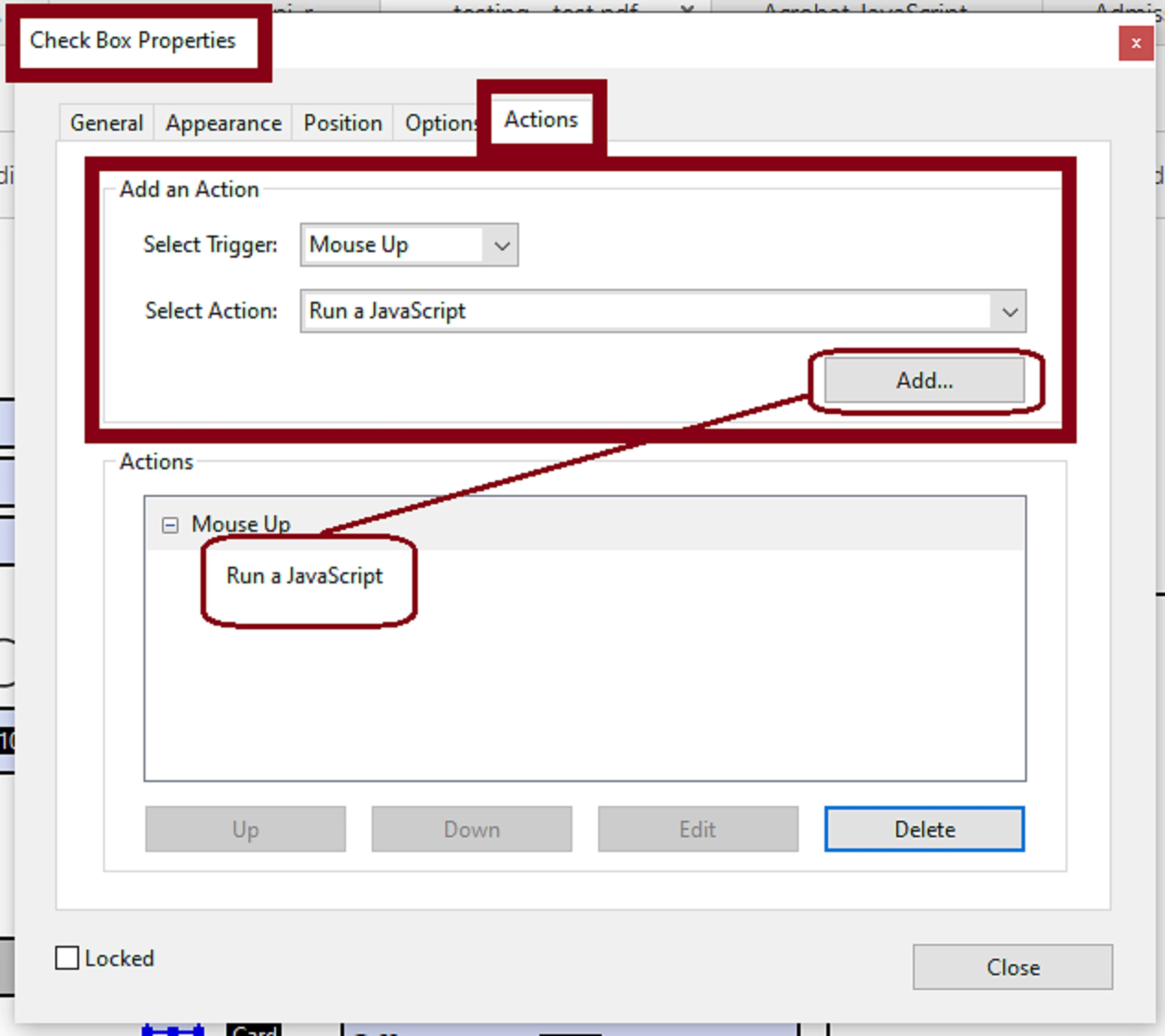


After you've clicked on "Add" use the code I am posting here for you (or modify as desired):


if (event.target.value !="Off") {
this.getField("CardYes").display = display.hidden; 
this.getField("CardYes").checkThisBox(0,false);
this.getField("CardNo").display = display.visible;
this.getField("CardNo").checkThisBox(0,true);

} else {

this.getField("CardYes").display = display.visible; 
this.getField("CardYes").checkThisBox(0,true);
this.getField("CardNo").display = display.hidden;
this.getField("CardNo").checkThisBox(0,false);

}


Click close to exit this dialogue box , and you should be good to go.

 

1 reply

ls_rbls
Community Expert
ls_rblsCommunity ExpertCorrect answer
Community Expert
June 29, 2020

I will answer your question  using the JavaScript example the Max Wyss posted in the following  thread a long while ago: https://answers.acrobatusers.com/show-hide-multiple-fields-based-on-a-check-box-and-then-make-them-show-again-q299956.aspx


You need a mouse up action javascript in the "Nofee" checkbox.


In edit mode, right-click on that checkbox field select Properties from the context menu.


This will open the Checkbox Properties dialogue box where you will then click on the "Actions" tab.


Follow the slide below:


After you've clicked on "Add" use the code I am posting here for you (or modify as desired):


if (event.target.value !="Off") {
this.getField("CardYes").display = display.hidden; 
this.getField("CardYes").checkThisBox(0,false);
this.getField("CardNo").display = display.visible;
this.getField("CardNo").checkThisBox(0,true);

} else {

this.getField("CardYes").display = display.visible; 
this.getField("CardYes").checkThisBox(0,true);
this.getField("CardNo").display = display.hidden;
this.getField("CardNo").checkThisBox(0,false);

}


Click close to exit this dialogue box , and you should be good to go.


Participant
June 29, 2020

Hi ls_rbls,


Thanks for coming back to me. 


After following your solution I then had an issue when I'd assigned CardYes to signer1, but this appears to be because this changes the name of the field to CardYes_es_:signer1. So when I've replaced CardYes with CardYes_es_:signer1 in your code this works perfectly.


Thank you so much!

ls_rbls
Community Expert
Community Expert
June 29, 2020

Your welcome.