Participant
January 2, 2016
Answered

Choosing the Right PDF Creation Workflow: When to Use Adobe Acrobat Distiller

  • January 2, 2016
  • 6 replies
  • 79425 views

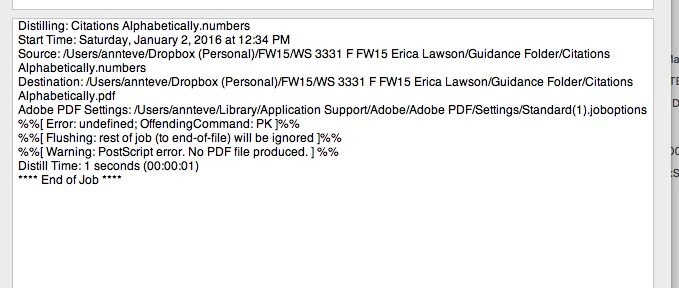
When is it necessary to use Adobe Distiller in the creation of PDFs? I use the Mac OS (i.e. OS X). I export from inside the application Pages. The resulting PDFs look (for the most part) fine. Occasionally, there are apparent font substitutions when I view the exported document in Adobe Acrobat Pro. I've experimented with Distiller but never been successful. This is a typical message. Is Distiller worth bothering with?

    Correct answer BaniVerma

    Hi all,


    Do I still need Adobe Acrobat Distiller?

    No — for most day-to-day PDF creation, Adobe's built-in export tools handle it without ever generating PostScript, so Distiller usually isn't needed. It's still the right tool specifically when your workflow produces a PostScript file, such as in commercial print and publishing environments.

    Most Adobe applications create PDF files directly, skipping the PostScript step entirely. Distiller exists specifically to convert PostScript (PS) files into PDF, a step still required in commercial printing, publishing, and other PostScript-based production environments, but not in typical day-to-day PDF creation.

    Acrobat Distiller Direct PDF Export
    Converts PostScript (PS) files into PDF Creates PDF directly from the application
    Intended for PostScript-based production workflows Recommended for most modern PDF creation workflows
    Used when PostScript output is part of the workflow No PostScript file required

    Reference: https://helpx.adobe.com/acrobat/desktop/create-documents/explore-advanced-conversion-settings/acrobat-distiller-overview.html


    When should I use Acrobat Distiller?

    Use Distiller when your workflow produces PostScript files that need converting to PDF, or when you're in a commercial print or publishing environment that depends on PostScript.

    One capability direct export doesn't offer: Distiller can process a folder of incoming PostScript files automatically using the same settings, and it remains the only path to PDF for applications, including some legacy tools and PostScript-only workflows, that have no native PDF export at all.

    For applications like Microsoft Office, Adobe InDesign, or Adobe Illustrator, use the application's built-in PDF export instead, Distiller isn't part of that workflow.

    Reference: https://helpx.adobe.com/acrobat/desktop/create-documents/explore-advanced-conversion-settings/acrobat-distiller-overview.html


    Why is font embedding important?

    Fonts with restricted permissions cannot be embedded and will generate an error during conversion, that's the specific failure point to know about before you rely on embedding.

    When Distiller can't embed or interpret a font, it substitutes another font instead, which can change the document's appearance, spacing, and line breaks. Embedding the original font (when its license permits) is what keeps a PDF looking and printing exactly as intended, regardless of what fonts the recipient has installed.

    Reference: https://helpx.adobe.com/acrobat/desktop/create-documents/explore-advanced-conversion-settings/distiller-fonts.html


    Thanks,

    ^BS

    6 replies

    BaniVerma
    Community Manager
    BaniVermaCommunity ManagerCorrect answer
    Community Manager
    August 7, 2026

    Hi all,


    Do I still need Adobe Acrobat Distiller?

    No — for most day-to-day PDF creation, Adobe's built-in export tools handle it without ever generating PostScript, so Distiller usually isn't needed. It's still the right tool specifically when your workflow produces a PostScript file, such as in commercial print and publishing environments.

    Most Adobe applications create PDF files directly, skipping the PostScript step entirely. Distiller exists specifically to convert PostScript (PS) files into PDF, a step still required in commercial printing, publishing, and other PostScript-based production environments, but not in typical day-to-day PDF creation.

    Acrobat Distiller Direct PDF Export
    Converts PostScript (PS) files into PDF Creates PDF directly from the application
    Intended for PostScript-based production workflows Recommended for most modern PDF creation workflows
    Used when PostScript output is part of the workflow No PostScript file required

    Reference: https://helpx.adobe.com/acrobat/desktop/create-documents/explore-advanced-conversion-settings/acrobat-distiller-overview.html


    When should I use Acrobat Distiller?

    Use Distiller when your workflow produces PostScript files that need converting to PDF, or when you're in a commercial print or publishing environment that depends on PostScript.

    One capability direct export doesn't offer: Distiller can process a folder of incoming PostScript files automatically using the same settings, and it remains the only path to PDF for applications, including some legacy tools and PostScript-only workflows, that have no native PDF export at all.

    For applications like Microsoft Office, Adobe InDesign, or Adobe Illustrator, use the application's built-in PDF export instead, Distiller isn't part of that workflow.

    Reference: https://helpx.adobe.com/acrobat/desktop/create-documents/explore-advanced-conversion-settings/acrobat-distiller-overview.html


    Why is font embedding important?

    Fonts with restricted permissions cannot be embedded and will generate an error during conversion, that's the specific failure point to know about before you rely on embedding.

    When Distiller can't embed or interpret a font, it substitutes another font instead, which can change the document's appearance, spacing, and line breaks. Embedding the original font (when its license permits) is what keeps a PDF looking and printing exactly as intended, regardless of what fonts the recipient has installed.

    Reference: https://helpx.adobe.com/acrobat/desktop/create-documents/explore-advanced-conversion-settings/distiller-fonts.html


    Thanks,

    ^BS

    Participant
    July 30, 2025

    I tried to uninstall adobe but the distiller component remains and it slows my system down.  They should make this an option. I have no, zip , zero interest in this leech of software.  

    jane-e
    Community Expert
    Community Expert
    April 17, 2016

    Using Adobe Distiller is old technology, and there are newer, better ways. Here is a paper written by Leonard Rosenthal that will explain it thoroughly. He calls it "refrying".

    http://www.gwg.org/wp-content/uploads/attachments/f121c163fa679f86977235da32290812.pdf

    Whenever possible, convert to PDF from within the program. Apple has a support page for Pages to PDF, and there is an Export command from within Pages:

    https://support.apple.com/kb/PH23606?locale=en_US&viewlocale=en_US

    Hope this helps,

    Jane Edwards

    Adobe Certified Instructor

    AadeshSingh
    Participating Frequently
    January 3, 2016

    Hi annt77764495.

    The Adobe Acrobat Distiller application converts PostScript language page descriptions into Portable Document Format (PDF) files. The Acrobat Distiller control interface, present in version 7 and later of Acrobat Distiller for the Macintosh and Microsoft Windows platforms, allows other applications to pro grammatically control the Distiller program.

    Fonts are an important consideration whether you are an application developer writing applications capable of embedding fonts or accessing embedded fonts within a file or using Distiller with font technology.

    Helpful links :-

    Regards,

    Aadesh

    Legend
    January 2, 2016

    There should be an option in the print dialog "Create Adobe PDF" or similar. Try that, it will use Distiller.

    Inspiring
    January 2, 2016

    Distiller is a program within the programs provided as part of the Acrobat package. Its only purpose is to convert Post Script language files into PDF files. The PS files could either stand alone or an intermediate output form form another program used to create the PDF file.

    Have you looked at using the Mac printer's option to create a PDF file?