Inspiring
February 12, 2023
Answered

Clean dropdown menu content

  • February 12, 2023
  • 2 replies
  • 1028 views

Hi
I created a button to delete the text contained in the dropdown menu fields.
The function inserted in the button script is this:
this.resetForm(["FIELD_1","FIELD_2","FIELD_3",etc.....])
In the options of each field I have inserted a blank space of two bars.
When I press the button, the text in the field is not deleted, or it is deleted but another option appears instead.
Please, is there anyone who can help me solve this question?

Thank you
This topic has been closed for replies.
Correct answer try67

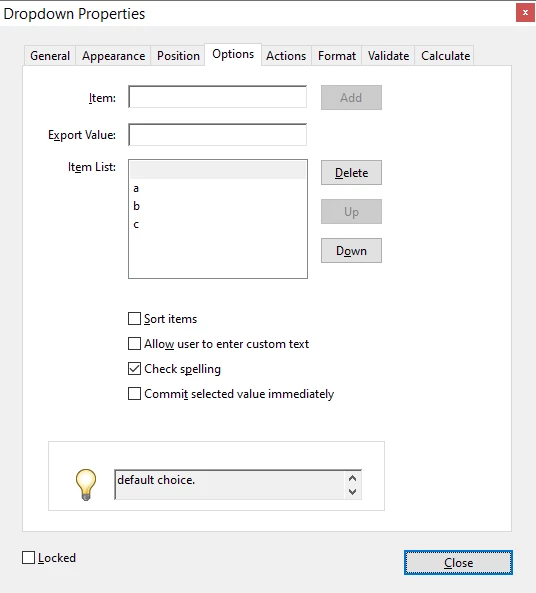
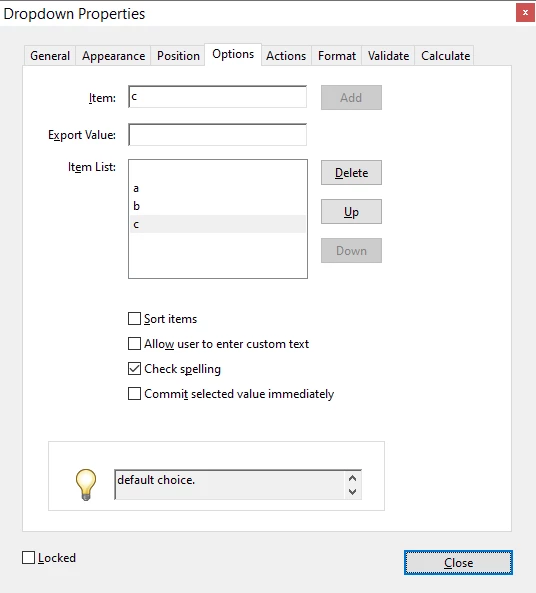
PS. Make sure you select the default value correctly. It's not just the first item in the list, it's the one's that highlighted when you close the Properties dialog.


This is NOT correct:


Here the "c" value is the default one.


This is correct:


Here the "blank" value is the default one.

2 replies

try67
Community Expert
Community Expert
February 12, 2023

It should work. The resetForm command resets the fields to their default values. Are you sure you entered the double-spaces in the right place? What other value is shown when you use this command?

try67
Community Expert
try67Community ExpertCorrect answer
Community Expert
February 12, 2023

PS. Make sure you select the default value correctly. It's not just the first item in the list, it's the one's that highlighted when you close the Properties dialog.


This is NOT correct:


Here the "c" value is the default one.


This is correct:


Here the "blank" value is the default one.

ENE5CD9Author
Inspiring
February 12, 2023

Thank you

Nesa Nurani
Community Expert
Community Expert
February 12, 2023

Instead of resetForm just set value to the one you want, in this case double blank space:

var fields = ["FIELD_1","FIELD_2","FIELD_3"];
for(var i in fields)
this.getField(fields[i]).value = " ";