


Participant
August 6, 2026
Pregunta

Color separation print to PDF

  • August 6, 2026
  • 5 respuestas
  • 26 visualizaciones

In Acrobat Pro (old version) I can prepare PDF file with separation by:

PRINT → Advance Print Setup → Color: Separations → ok → print 

I receive PDF file with each color separation on separate page. 
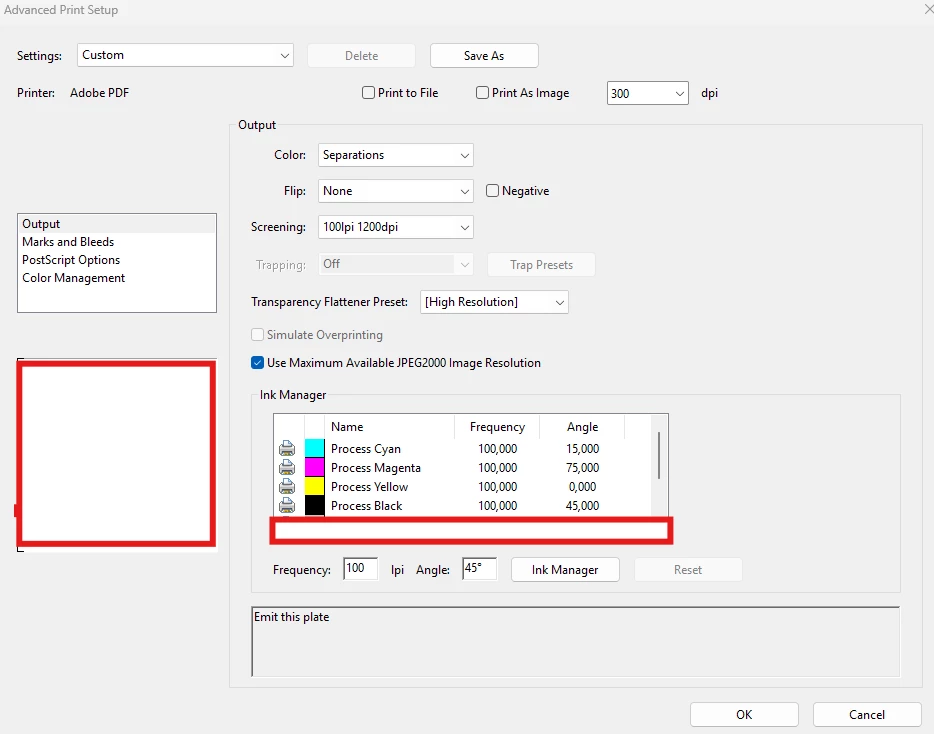
After change to new version of the program, when I prepare PDF that way I receive 1 page instead of each separation on each page individually. (eg. CMYK + P485+P122 → 6 pages PDF) 

    5 respuestas

    Meenakshi0101
    Community Manager
    Community Manager
    August 6, 2026

    Hi analytical_days946a,


    Thank you for reaching out and reporting this behaviour.

    We will share the details with our team for review. Could you please confirm the current version of Acrobat and the operating system version installed on your machine? Additionally, have you checked if the issue occurs with all files?


    We look forward to your response.


    Thanks,

    Meenakshi


    Participant
    August 6, 2026

    Thank you for fast replay. My Acrobat version is: 

    Operating system Windows 11 25h2. 

    Best Regards


    Anand Sri Bhattacharya
    Community Manager
    Community Manager
    August 6, 2026

    Hello @analytical_days946a,


    I hope you are doing well, and thanks for reaching out and sharing the details. We're sorry for the trouble.


    We'll get this checked internally and will share an update with you soon.

    For testing purposes, can you please try/check these suggestions, and let us know how it goes:


    Confirm which printer the job is actually going to:
    Host-based separations only work through a PostScript path, which is what the Adobe PDF printer provides. If the job is going to Microsoft Print to PDF (or another PDF writer), separations cannot be honoured, and you always get a single composite page. In the Print dialogue, make sure the printer is exactly "Adobe PDF", then click Properties and confirm the properties window actually names Adobe PDF.


    To confirm the file itself really contains all the inks, use All tools > Use print production > Output Preview and set Preview to Separations, then toggle each plate (CMYK + P485 + P122). Note this is an on-screen proof only; it does not produce the multi-page PDF.


    Let us know how it goes.

    Regards,

    Anand Sri.