
Inspiring
June 9, 2021
Answered

(Combine and OCR) or (OCR and Combine), which is better?

  • June 9, 2021
  • 1 reply
  • 2735 views

I scanned old internal reports to hundreds of PNGs. I need to turn each batch of PNGs into a single OCRed PDF using Acrobat. I am wondering which of the following two options is better:


  1. "Combine and OCR" -- combine PNGs into a PDF and then perform OCR (Editable Text and Images)
  2. "OCR and Combine" -- Perform OCR on multiple files (Editable Text and Images) and then combine the resulting PDFs into one PDF.


Preliminary testing (with 10 pages) seems to show that option 1 (Combine and OCR) will yield slightly smaller PDFs, but I am not sure why or if I can expect this on large scale as well.
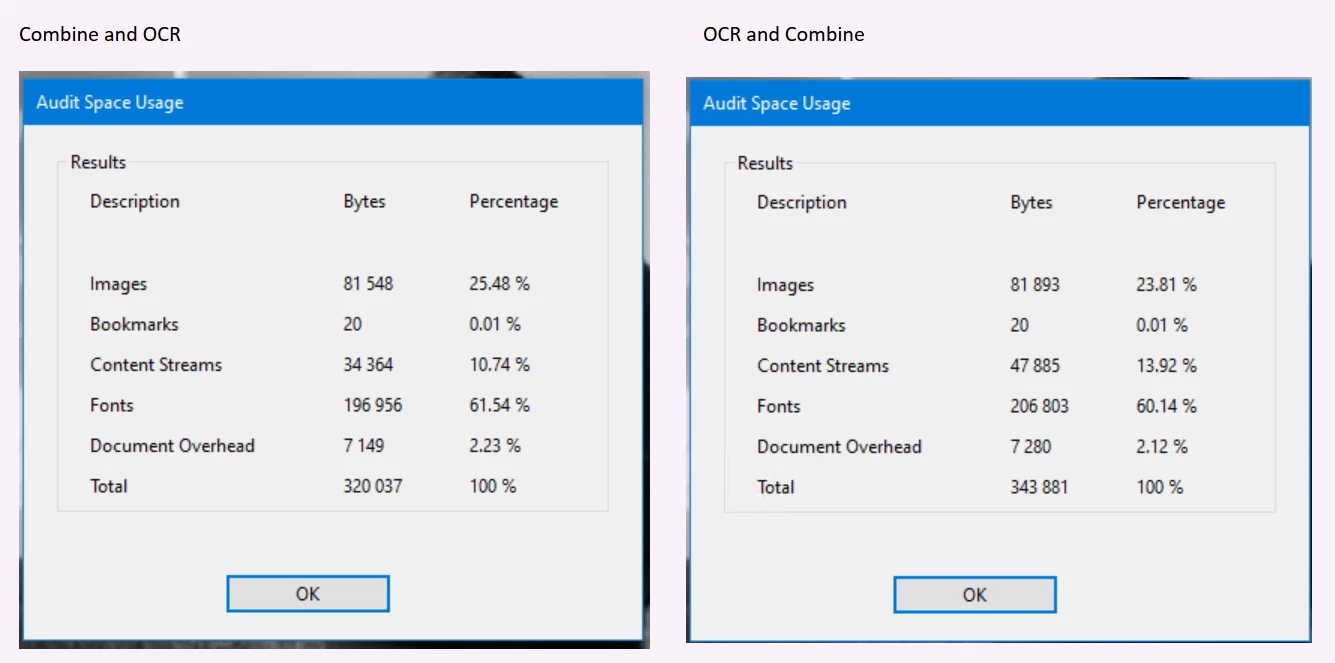
 

I assume that if I combine the PNGs to a single PDF and I OCR this PDF, the OCR engine can perhaps better optimize the fonts, the document overhead, etc. than when combining already OCRed PDFs into one larger PDF.


Anyone with more experience can provide advice or thoughts?
This topic has been closed for replies.
Correct answer gary_sc

In the grand scheme of things it doesn't make a bit of difference.


However, let me give you an interesting tip: If you save your documents as pngs or jpgs, and drag that document onto Acrobat, they will be converted into PDFs. And stop. However, if your document is saved as TIFs, and you drag your documents onto Acrobat, they will be converted into PDFs AND OCRed in the same process. 


And, if you drag a bunch of TIFs onto Acrobat a window will pop up and ask if you want all of these saved into one document or separate documents — and you can do either one.


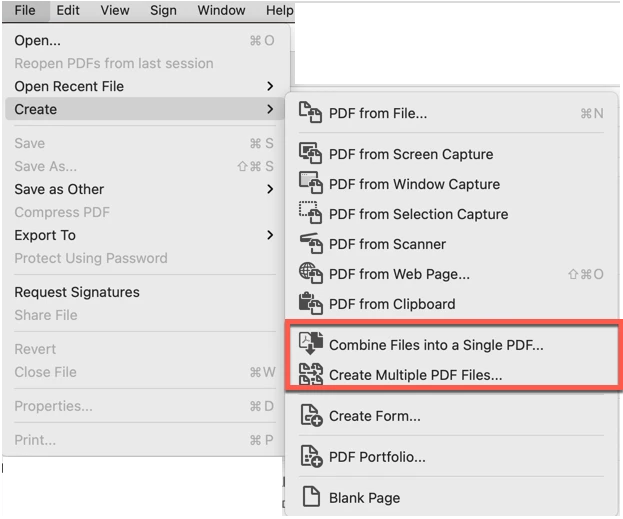
Now, I state that you can drag them onto the Acrobat icon but you can get the same result if you select either of these options here:

Now, one last hint: if you make sure the name of your documents are in proper order before you do the PDF-ing, you will not have to worry about their order in the final document. That is, if the names of your files are Joe.tif, Sam.tif, Mary.tif, there's no telling how they will land in your new single PDF. But if you number them, either 01-Sam.tif, 02-Joe.tif, etc. Than their order is secured. Oh, one more on this issue: if you scan into a folder, typically the 2nd item will be auto-numbered. That is noname.tif, noname-2.tif, noname-3.tif, etc. If you remember, it's important to fix the first one and call it noname-1.tif. Otherwise that first one will be at the end of your combined document.


Oh, one last last thing: here's a blog I wrote for Adobe years ago, you might find some scanning tips:

http://photosbycoyne.com/Gary's_Help/Scanning/clean-scanning.html


1 reply

gary_sc
Community Expert
gary_scCommunity ExpertCorrect answer
Community Expert
June 9, 2021

In the grand scheme of things it doesn't make a bit of difference.


However, let me give you an interesting tip: If you save your documents as pngs or jpgs, and drag that document onto Acrobat, they will be converted into PDFs. And stop. However, if your document is saved as TIFs, and you drag your documents onto Acrobat, they will be converted into PDFs AND OCRed in the same process. 


And, if you drag a bunch of TIFs onto Acrobat a window will pop up and ask if you want all of these saved into one document or separate documents — and you can do either one.


Now, I state that you can drag them onto the Acrobat icon but you can get the same result if you select either of these options here:

Now, one last hint: if you make sure the name of your documents are in proper order before you do the PDF-ing, you will not have to worry about their order in the final document. That is, if the names of your files are Joe.tif, Sam.tif, Mary.tif, there's no telling how they will land in your new single PDF. But if you number them, either 01-Sam.tif, 02-Joe.tif, etc. Than their order is secured. Oh, one more on this issue: if you scan into a folder, typically the 2nd item will be auto-numbered. That is noname.tif, noname-2.tif, noname-3.tif, etc. If you remember, it's important to fix the first one and call it noname-1.tif. Otherwise that first one will be at the end of your combined document.


Oh, one last last thing: here's a blog I wrote for Adobe years ago, you might find some scanning tips:

http://photosbycoyne.com/Gary's_Help/Scanning/clean-scanning.html


Inspiring
June 9, 2021

Hi gary_sc, thank you very much for all your tips. I did not know about TIF auto-OCR vs PNG... that's interesting.


I did indeed name my files in the right order.


I completed a 400 page report following both ways ("Combine and OCR" and "OCR and Combine") and the difference was significant. The former ("Combine and OCR") was 20% smaller than the later. Furthermore, the later gave a "The font 'Times New Roman-Italic-110869' contains bad /Widths" error when going through the PDF, which did not occur with the former.


It probably depends on the type of document (ration of images vs text, quality of the individual files, pre-preparation of the files, etc.), but it would seem that combining into one large PDF and OCRing after may not only result in a slightly smaller file for the same final quality, but also avoid strange font errors.