
Participant
November 13, 2017
Answered

Combine files into PDF is not working the same with newer version of Acrobat

  • November 13, 2017
  • 2 replies
  • 770 views

I can't see all of the pages within a single pdf at once or move or delete the pages. I need to be able combine separate pdfs but also be able to see all of the pages at once, move, and delete the pages. Before, I could click on the individual pages within a single pdf and drag them into the order I wanted them. I could make the pages smaller or larger to see them better. I could also right-click on a page and delete it. Now, it will only let me see one page at a time and change the order of separate pdfs being combined. I can no longer change the order of pages within a single pdf. I can delete pages within a single pdf by choosing the page number order, ex 1-5,7,8, deleting page 6. Before, I could see pages 1 - 8 all at once and delete page 6 by right-clicking page 6 and choosing delete. This is a MAJOR change and will make my job much harder! Is there another software or add-in that I need? Please help me! Thanks!
This topic has been closed for replies.
Correct answer Dave__M

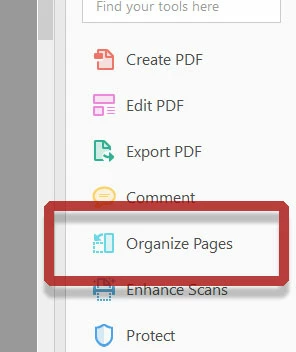
If you have not yet explored it, there is a Organize Pages tool in Acrobat Pro DC.  Look in the list of tools on the right.

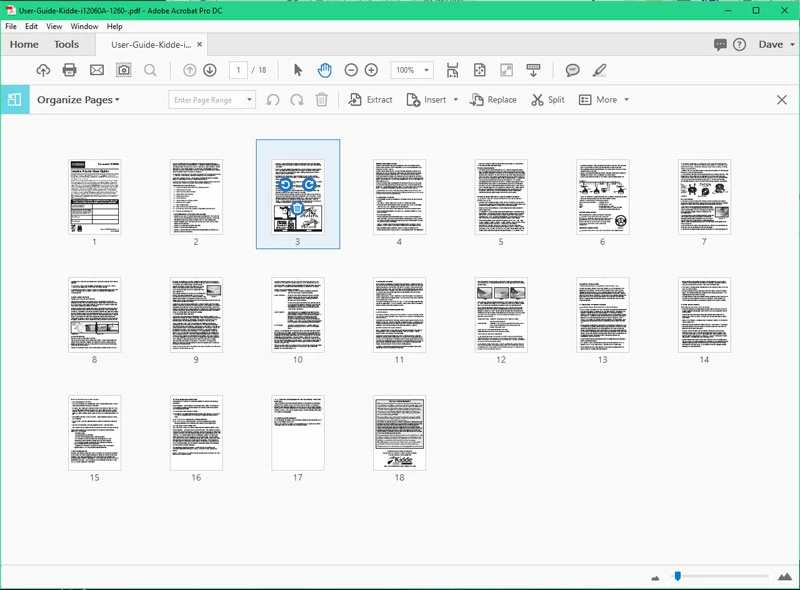
Once you click on it, you will see the interface shown below.

You should be able to zoom in & out to see all of your pages, and rearrange or delete whatever pages you wish.

I hope this is helpful.

My best,

Dave

2 replies

Dave__M
Community Expert
Dave__MCommunity ExpertCorrect answer
Community Expert
December 29, 2017

If you have not yet explored it, there is a Organize Pages tool in Acrobat Pro DC.  Look in the list of tools on the right.

Once you click on it, you will see the interface shown below.

You should be able to zoom in & out to see all of your pages, and rearrange or delete whatever pages you wish.

I hope this is helpful.

My best,

Dave

Adorobat
Participating Frequently
December 29, 2017

Hi Lashundrah,

Sorry for the delay in response.

Based on the description mentioned above, it seems you have 'List View' on, try switching to 'Thumbnail view' and see if that helps.

Below is the screenshot:

For more info, please visit this link: Combine documents into one PDF |

Feel free to update this discussion if you need any help.

Shivam