
Participant
July 9, 2024
Question

Combine only the active sheet from multiple Excel files into single PDF

  • July 9, 2024
  • 1 reply
  • 513 views

Adobe Acrobat Pro 2020 with Excel 365.  In the past, I have been able to combine multiple Excel files into a single PDF with it only pulling selected worksheet.  Now it is pulling all worksheets from every file.  I have the Convert entire Excel workbook unchecked. 
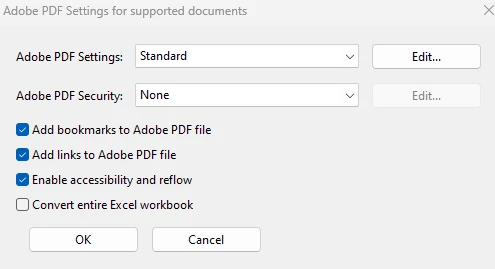
Having to delete extra pages or convert each file individually takes a massive amount of time when dealing with 20+ files multiple times per day.  Is there anything else I can try?

This topic has been closed for replies.

1 reply

Amal.
Community Manager
Community Manager
July 17, 2024

Hi there,


Hope you are doing well and thanks for reaching out.


What is the version of the OS and the Acrobat Pro 2020 you are using? To check the version go to Help > About Acrobat and make sure you have the recent version 20.05.3063x installed. Go to Help > Check for updates and reboot the computer once.


You may also, try to repair the installation from the help menu (Win Only) and see if that works.
 
Please try to reset the Acrobat preferences as described here (https://adobe.ly/3Y6DN8g)

~Amal

S_S
Community Manager
Community Manager
August 31, 2024

Hi @Beth35485717aols,


Hope you are doing well. Sorry for the trouble! 


Do you still experience the issue with the update as Amal suggested above?

If yes, would you mind sharing a few pieces of information for further investigation:

1. The OS version of your computer;

2. A screen recording of the issue for further investigation.


Look forward to hearing from you.


-Souvik