
akhoej
Participant
March 24, 2019
Answered

Combining cropped pages

  • March 24, 2019
  • 2 replies
  • 5127 views

Hi,

I often need to combine parts of pdf pages into one page.

Using Adobe Acrobat 9 Pro I have cropped 2 pages and saved them in different files.

I can combine these 2 files but this gives me a file with 2 pages.

I am not interested in solutions involving the snapshot tool - it won't do the job.

regars
This topic has been closed for replies.
Correct answer Bernd Alheit

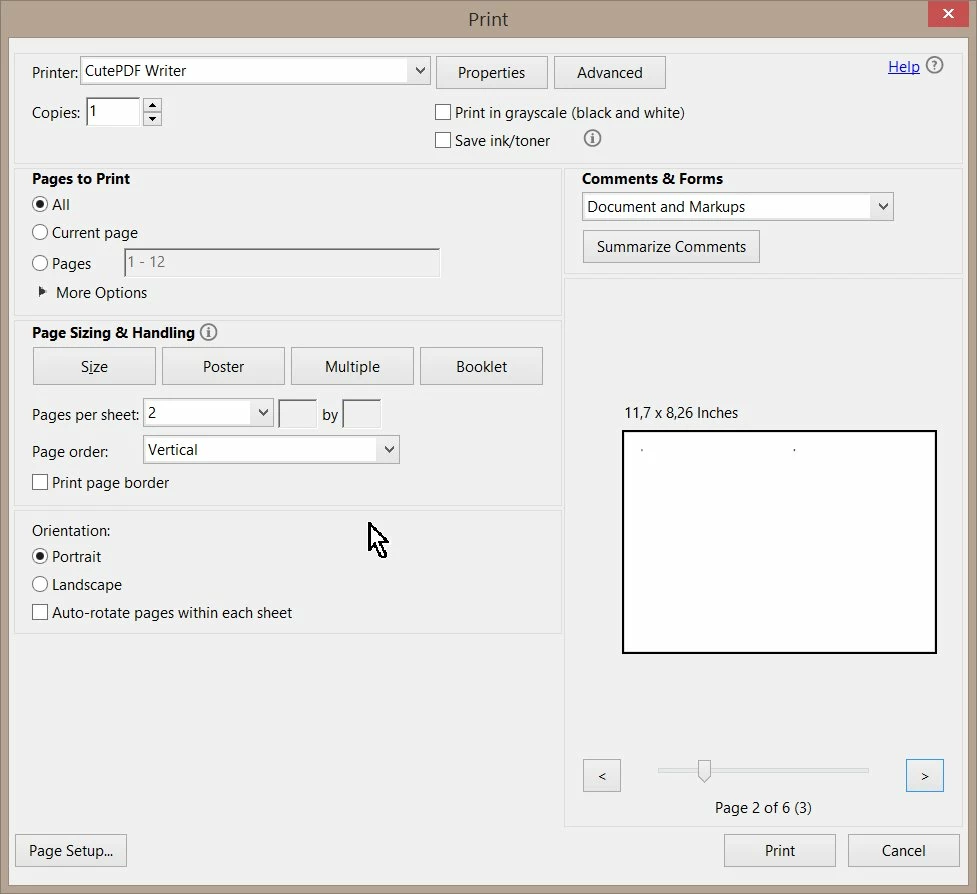
Use the Multiple option in the print dialog:

2 replies

Luke Jennings
Inspiring
March 28, 2019

Are you comfortable with InDesign? This is a much better way to do this, compared to Acrobat alone.

Create a new document at the desired size, place the two PDFs into it, crop, re-size, move as desired, export to a new PDF.

akhoej
akhoejAuthor
Participant
March 31, 2019

Unfortunately not, perhaps I should:-/

Bernd Alheit
Community Expert
Community Expert
March 25, 2019

On a Windows system you can try printing to Adobe PDF.

akhoej
akhoejAuthor
Participant
March 28, 2019

Thank you, I have tried, but I don't seem to get the option of printing to "odd" pages on one page.

Bernd Alheit
Community Expert
Bernd AlheitCommunity ExpertCorrect answer
Community Expert
March 28, 2019

Use the Multiple option in the print dialog: