


Participant
May 28, 2021
Answered

combining files

  • May 28, 2021
  • 2 replies
  • 1638 views

I have 12 bank statements that I have in 12 separate pdf files.  How do I combine them into one file where there are 36 continuous pages (each statement is 3 pages).  Right now, when I combine them, I have 12 separate documents inside of one portfolio and I have to click on each month to go to those pages.  I want to be able to start on page one (January), and scroll all the way through to the last page (December).  Can anyone help me.
This topic has been closed for replies.
Correct answer try67

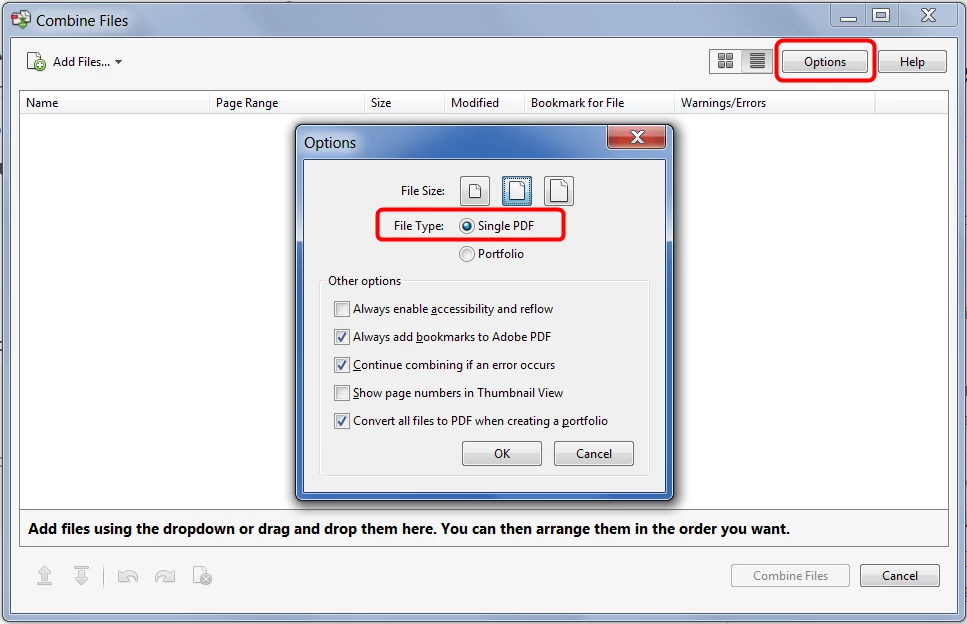
In the Combine Files dialog click the Options button and change File Type to Single PDF:


Note that if the files you're trying to merge a digitally signed or secured this won't work. In that case you will have to use a Portfolio.

2 replies

try67
Community Expert
try67Community ExpertCorrect answer
Community Expert
May 28, 2021

In the Combine Files dialog click the Options button and change File Type to Single PDF:


Note that if the files you're trying to merge a digitally signed or secured this won't work. In that case you will have to use a Portfolio.

Participant
September 29, 2021

I am having the same problem as described here. I do not have the option of selecting the file type, but when I unchecked "Savew as PDF Portfolio" my issue was resolved. Thank you all for pointing me in the right direction.

Bernd Alheit
Community Expert
Community Expert
May 28, 2021

When the files are not secured you create a PDF file.

Participant
September 29, 2021

I also dowload these type of folder for my website that are also on risk