
marquisn66237409
Participant
October 6, 2017
Answered

Combining PDFs

  • October 6, 2017
  • 2 replies
  • 1390 views

Everytime I combine pdf's

1) they are in indvidual files not one portfolio

2) when you save it and open it, it makes you open adobe reader

This never use to be the case.  How do you correct this?

[Title spelling corrected by moderator to clarify combine not comb.]
This topic has been closed for replies.
Correct answer Karl Heinz Kremer

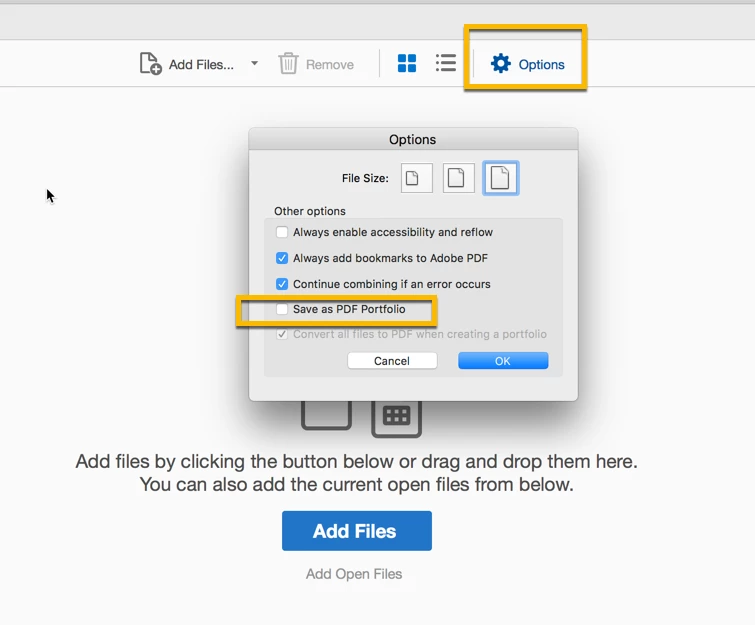
I think you are mixing up some terms here. If you see individual files after you combine files, then you are dealign with a portfolio. If you want to merge into a "Single File" (that's the term that is used on some versions of Acrobat's merge dialog), then you have to switch from Portfolio to Single File. You can do that on the "Options" dialog. For the latest version of Acrobat DC, all you need to do is to uncheck the "Save as PDF Portfolio" option:

2 replies

jane-e
Community Expert
Community Expert
October 7, 2017

marquisn66237409  wrote

Everytime I combine pdf's

2) when you save it and open it, it makes you open adobe reader

This never use to be the case.  How do you correct this?

This is controlled by your operating system. You specify which program should open PDFs when you double-click.

On a Mac, right-click and choose Get Info

On Windows, right-click and I think it is Open With

Either way, specify all PDF files, not just the current one.

Karl Heinz  Kremer
Community Expert
Karl Heinz KremerCommunity ExpertCorrect answer
Community Expert
October 6, 2017

I think you are mixing up some terms here. If you see individual files after you combine files, then you are dealign with a portfolio. If you want to merge into a "Single File" (that's the term that is used on some versions of Acrobat's merge dialog), then you have to switch from Portfolio to Single File. You can do that on the "Options" dialog. For the latest version of Acrobat DC, all you need to do is to uncheck the "Save as PDF Portfolio" option: