
Participant
April 1, 2025
Question

Combining png-files into a single PDF creates pixels around the letters.

  • April 1, 2025
  • 1 reply
  • 234 views

Hello everyone,


I chose "combine files into a single PDF" and selected "larger file size" in the options, then I added 212 png-files and clicked "combine". In the resulting pdf the text is surrounded by a lot of grey pixels that were not there in the original png-file. Here is a screenshot for comparison. Above the png, below the resulting pdf.
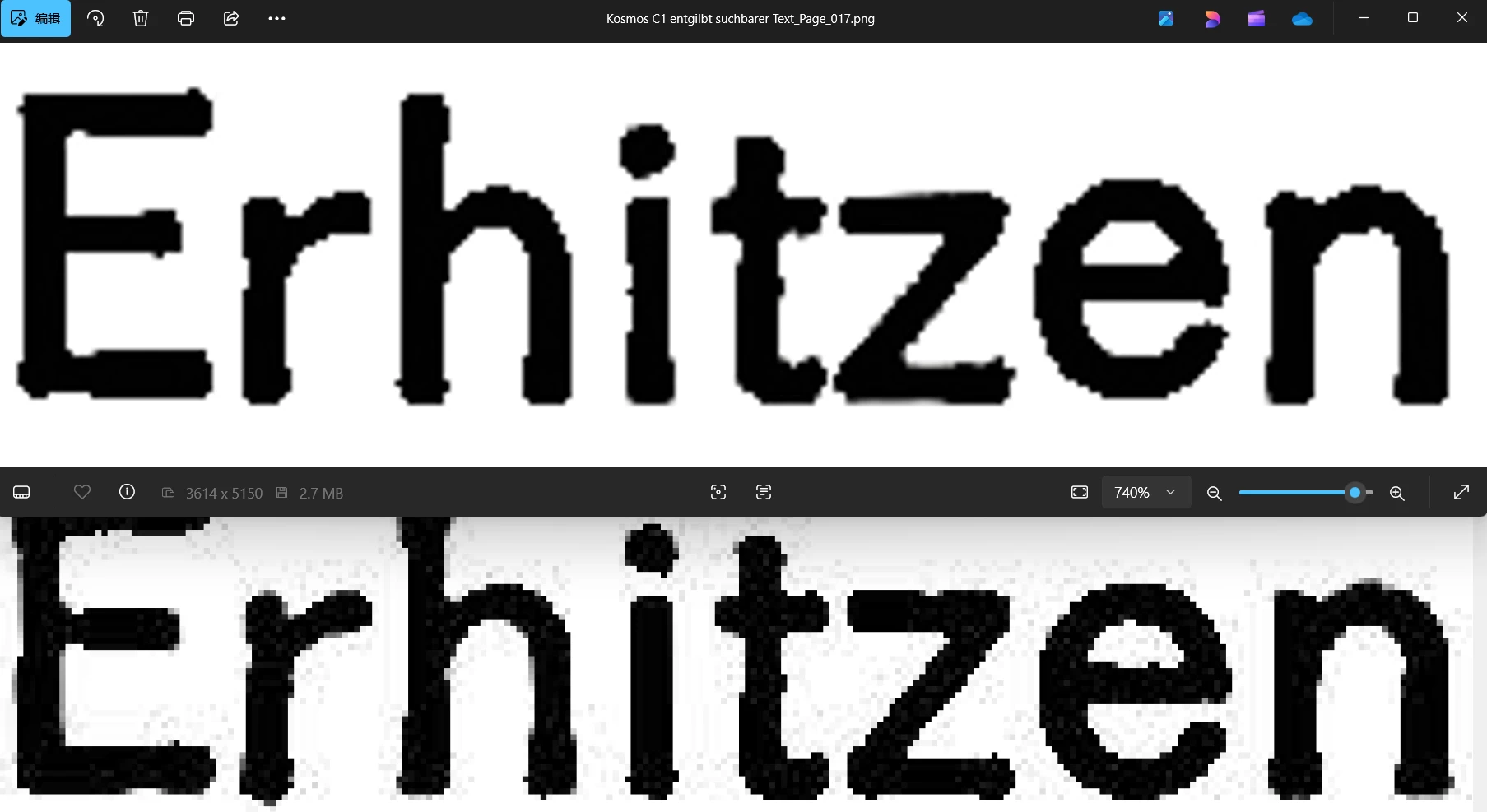
 

Why does Acrobat do that and how to make it stop doing it?

1 reply

Luke Jennings3
Community Expert
Community Expert
April 1, 2025

Those dots look like jpeg artifacts, they can appear after rgb to cmyk conversion, compression, or changing the resolution. I'm not sure how to prevent it from happening, but try converting your png files to pdfs before combining (I think you can use an Action to do it as a batch).

Here is a link to a related discussion: 

https://community.adobe.com/t5/acrobat-discussions/how-to-stop-acrobat-from-compressing-jpg-images-when-opening-them-and-creating-weird-artifacts/td-p/13732866