
Participant
February 22, 2023
Question

combining word files in Adobe Acrobat Pro dosen't work anymore!!

  • February 22, 2023
  • 2 replies
  • 2032 views

Create merged PDFs

Use the Combine Files tool to merge Word, Excel, PowerPoint, audio, or video files, web pages, or existing PDFs. Acrobat lets you preview and arrange the documents and pages before creating the file. You can delete unwanted pages and move individual pages from a document anywhere among the pages being combined. Acrobat converts the pages of the various files into sequential pages of a single PDF.


This does not work for Word docs, it just gives an error message!!! It use to work before I had to upgrade. 
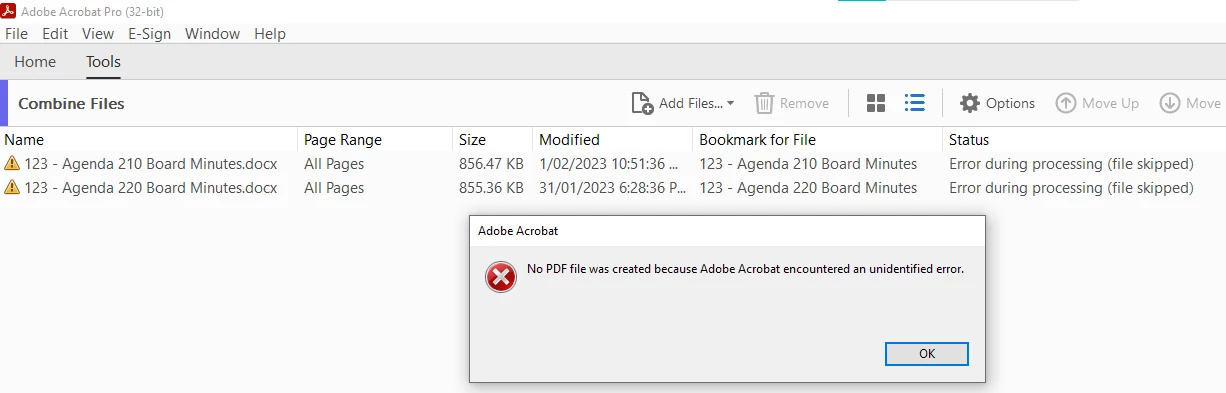
Can someone please help as this was one of the main reasons I use Acrobat Pro

This topic has been closed for replies.

2 replies

Participant
February 23, 2023

Thanks Amal.

I deleted all of the 2.X files as I run Office365.

Now 'combining files' doesn't give an error message but it appears to go into a loop upon converting 1st word file?

It now opens Word and asks to save the pdf. This did not happen on the pre-Acrobat Pro version. Previously it appeared to create the pdf in the background but never save?

After choosing to save the pdf it then goes into the loop!

[cid:image001.png@01D94787.D7C095A0]

Kind Regards

Michael Kleinig

[P>I Removed by moderator]

Participant
March 6, 2023

Does anyone have any other suggestions as to how to make this past feature functional again??

Following the above advice now leads to "'combining files' doesn't give an error message but it appears to go into a loop upon converting 1st word file?"


Amal.
Legend
March 8, 2023

Hi @Michael Kleinig 


This issue is reported to our development team and being worked upon.


The fix will be available in the future updates.


Regards

Amal

Amal.
Legend
February 22, 2023

Hi @Michael Kleinig 


Hope you are doing well and sorry to hear that.


Please review the help page https://helpx.adobe.com/acrobat/kb/unable-to-combine-docx-file-using-Acrobat-getting-unidentified-error-message.html and see if that works for you.


Regards

Amal


Got your issue resolved? Please label the response as 'Correct Answer' to help your fellow community members find a solution to similar problems.