
Inspiring
October 31, 2023
Question

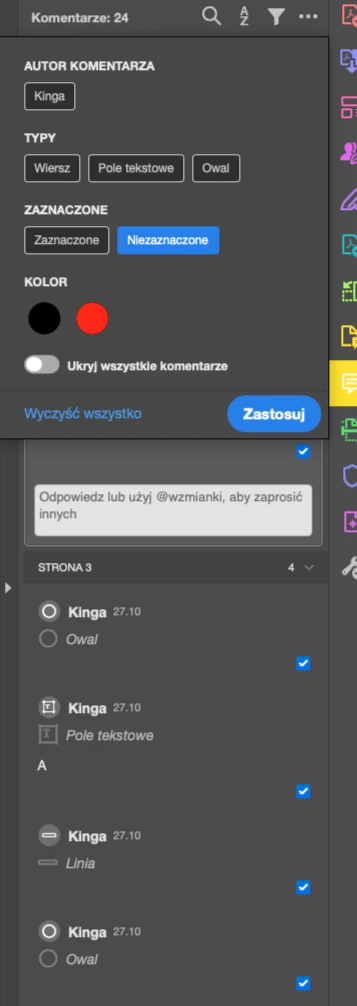
Comment filtering doesn't work

  • October 31, 2023
  • 3 replies
  • 1081 views

Hi. Acrobat 23.0, Sonoma. Attempts to enable unchecked comments in the filter window. It doesn't work, nothing happens. It doesn't filter and I can still see all the selected comments. Have you noticed something like this?
 

This topic has been closed for replies.

3 replies

graphic mac
Inspiring
February 25, 2024

This bug has been fixed in the latest Acrobat version.

Participant
March 4, 2024

i had the latest version and the problem persists in sonoma 😞 i don't know what to do

Known Participant
November 2, 2023

We are receiving reports as well.
I'm curious if you are using the New GUI?
What happens if you switch back to the old GUI? (on Mac: acrobat Menu/View/Disable New Acrobat)

graphic mac
Inspiring
November 2, 2023

I don't even have that option. Never have.

I'm running macOS 14.1 on an M1 Max and Adobe Acrobat DC (Pro) Continuous Release, Version 2023.006.20360.

I've tried resetting preferences, re-installing Acrobat completely... nothing works.

graphic mac
Inspiring
November 2, 2023

This just started happening to me a few days ago as well. I've been running Sonoma since it's release and it was working fine. Filtering ANYTHING doesn't work, doesn't matter if it's checkmarks, name, type, etc. None of the filters work.


Adding this to the complete disappearance of scrollbars, and the obscenely sensitive scrolling speed on my list of reasons to find an alternative to Acrobat.


So frustrating.