


Participant
Oct 26, 2026 4:36 PM UTC
Question

Comment/Markup Colors Faded when Printing PDF to PDF

I use Acrobat’s “comments” tools to add markups to PDFs. After the documents are marked up, we print the PDF to PDF so the comments are “locked” in, and can’t be easily edited by the document’s receiving party. 

The printed markups are always faded and grayish. This isn’t ideal because usually we are trying to call attention to the things we have marked up on our documents, so we want the colors to stay vibrant.

Over the years I’ve had some success preserving color vibrancy by changing the advanced print color management settings but I honestly have zero idea how color processing works and I’ve mostly just clicked different options and tried printing until something works. But even after I find a setting that works, it often stops working seemingly out of random. It could be different documents, but many times we are working with the same library of documents. 

See below example and thanks for any help you can provide. 
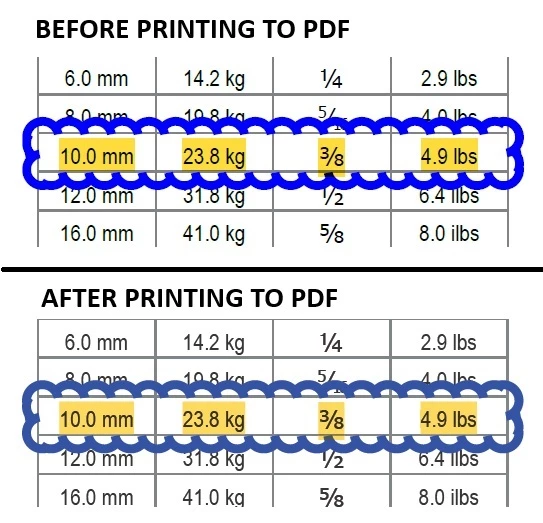
Color fading before and after printing PDF to PDF. 


    6 replies

    davecourtemanche
    Legend
    Oct 26, 2026 4:47 PM UTC

    It looks like a RGB to CMYK conversion is happening when you “print to PDF”. Try using an RGB profile. Have you thought of just password locking the PDF to not allow editing to preserve the comments without the extra step?

    Translate
    Participant
    Oct 26, 2026 6:47 PM UTC

    I have tried selecting RGB options and it works sometimes but not all the time, and I’m having trouble understanding why. 

    Unfortunately password locking PDFs is not a viable solution for us due to the collaborative nature of our work. 

    Translate
    Community Manager
    Oct 26, 2026 7:22 PM UTC

    Hi ​@Amanda28226157bjq3,

    Thanks for sharing the before and after example, it makes the difference easy to see. Having your markups go dull when the whole point is to make them stand out is frustrating, and it’s worse when a setting works one day and then stops.

    Just so we’re on the same page: you mark up a PDF with the comment tools, print it to PDF, and the markup colors come out faded. Changing the color options in the advanced print settings sometimes brings the vibrancy back, but not reliably across documents.

    A few quick questions to help us pin this down:

    1. Which Acrobat are you using (Pro, Standard or Reader), what’s the exact version number, and are you on Windows or Mac?
    2. Which printer do you pick in the Print dialog, and what is selected under Advanced > Color Handling when the colors come out right versus when they come out faded?
    3. Is it only the markups that look faded, or does the rest of the page (images, colored text) look duller too? If you can, a screenshot of the Advanced Print Setup window would help as well.

    In the meantime, if you’re on Acrobat Pro, this page explains how color management works in the Advanced Print Setup dialog: https://helpx.adobe.com/acrobat/desktop/print-documents/color-print-quality/color-manage-composite.html

    Send those details over and we’ll take it from there.

    Thanks,
    ^AV

    Translate