Participant
December 15, 2017
Question

Comment regarding Text Editing Font in Acrobat

  • December 15, 2017
  • 1 reply
  • 480 views

While using Acrobat to enter text in a form, a field required a numeric value.

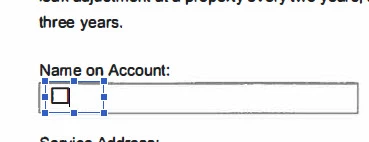
Using the keypad, I typed a "0" (zero) but the form displayed a checkbox instead of a number -
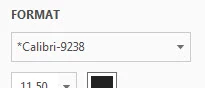
The default font was set to *Calibri - 9238" -
When I switched the font to Arial a numeric value displayed.

Any thoughts?

This topic has been closed for replies.

1 reply

Thom Parker
Community Expert
Community Expert
December 15, 2017

Very odd, that is not a normal font for a field. Where did this form come from? Who Created it? 

However, the screen shot is of the Edit PDF display, so your screen shot does not show a field font. It shows the font for content text on the PDF, that is underneath the form field. Did you enter text using the Edit PDF tool? If so then this issue has nothing to do with form fields. It is likely the font is subsetted. Which explains the funny name. So any text entered using it may be defaulted to a square if the subset does not include the entered character, which is what happened to you.

To get the field font use the "Prepare Form" tools. 

To enter text into a form field, just click on it with the regular Hand cursor.

Thom Parker - Software Developer at PDFScriptingUse the Acrobat JavaScript Reference early and often
Participant
December 18, 2017

Thanks for your post.

Regarding your questions, the form was provided by the Baltimore City Department of Public Works; I have no information who created it.

I entered the text using the "Edit Text" option in Acrobat.

It occurred to me that the font may be some variation of a Windows font because Calibri is a default when creating Windows documents and emails.  I also thought it may have something to do with what was know as truetype fonts but I don't know if truetype is still a consideration theses days.

I failed to mention in my initial post that the odd character only displayed when I entered "0" (zero), all other numbers displayed correctly.  I also didn't test on a Mac.

I'll look into the Prepare Forms tools

One other thing, I realize the value of your time and effort and because this form had a submission deadline I completed it by hand, scanned it and forwarded it to the appropriate party.  Because there's no urgent need at this point, please act accordingly.