
Commenting tool broken in latest update (for Mac v. 2023.003.20284 Pro
I'm so confused. Beyond confused and unbelievablly frustrated. This is impacting my job.
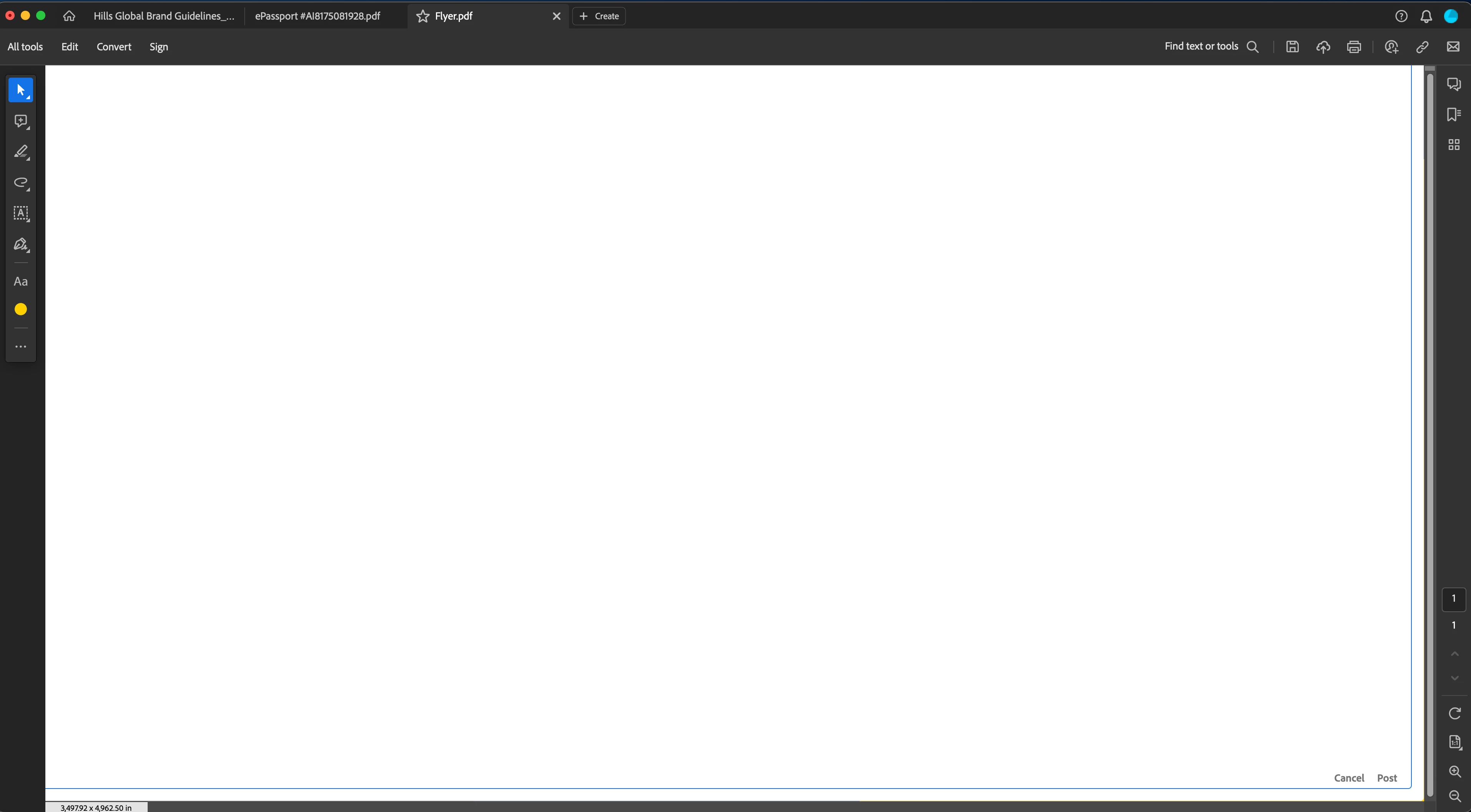
See screenshot below. I have a PDF open and simply trying to add a comment. I right click, hit Add Comment and the below box pops up completely blocking the original PDF. You notice no PDF is visible, only the huge white box and down in the right hand corner very small it says Cancel or Post. When I type my Comment, I can't even see any words appearing on screen. I can't tell what I'm typing because it's not visible. And I'm on a larger monitor here. After blind typing I hit Post and I think it worked but unlike in the previous iteration of Acrobat Pro, a small comment box is NOT visible on the PDF for me to know there is a comment there. When I mouseover to the right hand side of the PDF a GIANT and I mean GIANT comment box appears, big yellow box that blocks out a chunk of the PDF and fills a margin area as wide as the PDF itself with the small text i blind-typed in the middle.
This is absurd. What is going on? Is this a known bug? Is there some setting I can change? Is no one else having this issue on Mac? Please help! I'm struggling to do my job with this issue.
 AdChoices