


Known Participant
September 20, 2024
Question

Comments are duplicated after uploading a PDF to Share for Review

  • September 20, 2024
  • 2 replies
  • 824 views

Periodically I experience an issue where I add several comments to a PDF, share that annotated file with others using the "Share" button, then a day later notice that all or some of my comments have been duplicated. See below from an incident that happened today:
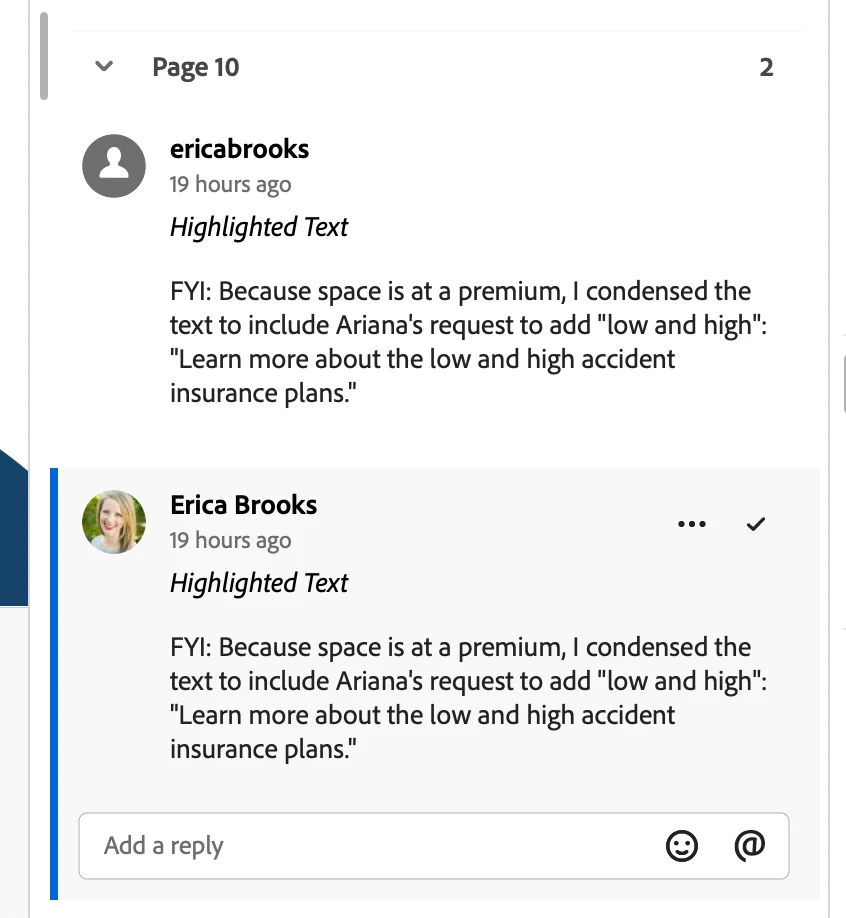


In today's incident, when I opened the file, one version of each comment used my photo and my name in title case, and one version of each comment used a red and blue cartoon avatar and my name lowercase all one word. I deleted all the cartoon avatar comments. Then restarted Acrobat. When I opened the application again, a third of the deleted comments were still there, but this time it showed my photo instead of the cartoon avatar. I deleted all the comments by the lowercase, one-word version of my name. Then closed the file and opened it again. This time, the same comments had returned again, but showed a gray icon for my avatar. 


WHAT IS GOING ON?!?!?! This same issue happened on two different files that I shared yesterday.

2 replies

David+GSCV
Participant
June 10, 2026

I came across this thread while searching for this same problem, as it occurred to me today. Is there a solution? Thank you!

Community Manager
June 10, 2026

Hi ​@David+GSCV

Thanks for reaching out, and sorry for the troubled experience. 
I am checking internally on this with the product team and will keep this discussion updated.

In the meantime, could you please share the file with us or provide a screen recording? Does the issue occur every time you share a PDF file, or does it happen randomly? If it happens randomly, could you send us one file that worked normally and another that has issues?

~Tariq

David+GSCV
Participant
June 10, 2026

Hi Tariq. Unfortunately, the document I am experiencing this on was given to me by a client under strict NDA. It contains sensitive information and I cannot share it. We have the original document before the comments were duplicated. We have tried making copies of it and sharing the copies, and each time it’s been shared, the comments are duplicated - but not all of them! There are 374 comments in the original document, and 667 in one shared version, and 678 in another shared version. We have not yet figured out which comments are not duplicated. Sorry I can’t be of further assistance. Once we are done with this work, I can try and create a non-sensitive document that I can share, if I can duplicate the problem. Thank you very much for your quick response!

Adobe Employee
September 25, 2024

Hi @eleighb 

Sorry for the inconvenience, can you please answer below queries to help us debug the issue.

1. App version installed on your machine

2. Is this happening with all files being shared or few specific files

3. Since when did you notice this issue ? recently or did it happen earlier as well.

4. If possible can you please share link to a sample shared file where this issue is observed(have sent you a private message, for the same)


Thanks,

Rohit A

eleighbAuthor
Known Participant
September 25, 2024

Hi Rohit,

Thank you for checking in about this issue. I responded to your private message with links to documents where this issue happened. Below are my answers for questions 1-3):


  1.  Adobe Acrobat Pro: Continuous Release | Version 2024.003.20121
  2.  This is just happeneing with a couple of files. However, my clients are reporting that they have left comments that duplicate themselves within the same comment box. By that, I mean that after they post a comment, the text they enter appears twice in the same comment box: They'll write one sentence, and that sentence will appear twice.
  3.  This issue used to happen sporadically, but hasn't happened in several months until it did last week.


Thanks for looking into this issue.

Adobe Employee
September 26, 2024

Thank you @eleighb for sharing the details. We will look into in and revert with our findings.