Participant
October 30, 2020
Answered

como puedo obtener ejemplos de un pdf o comparar fechas

  • October 30, 2020
  • 1 reply
  • 892 views

hola quiero bajar algun ejemplo que pueda estudiar para ver como se hace isertar un script en un docuemneto pdf , la verdad solo necesito tener dos campos una con la fecha actual y el otro una fecha limite que se pone manual para compararlas y si es mayor solo cerrar el pdf y no se pueda seguir leyendo, gracias por la ayuda que me puedan prestar.

This topic has been closed for replies.
Correct answer ls_rbls

Hi, 


You can do this by creating two date fields.


In my example I will use "DATE1" for the field that will be populating the current date automatically, and "DATE2" which is the field that I will run my calculation script from.


So first, to insert a script in a field object you need to select the "Prepare Form" tool in order to be able to edit the field properties of any field objects in your PDF. Then right-click on the desired field and select from the context menu "Properties". This will open up the field properties dialogue box.


Go ahead and click on the "Calculate" tab of "DATE1" , you may copy the following script below and paste it in the "Custom Calculation Script Section" as shown in the slide below: 


event.value = util.printd("mmmm d, yyyy", new Date());
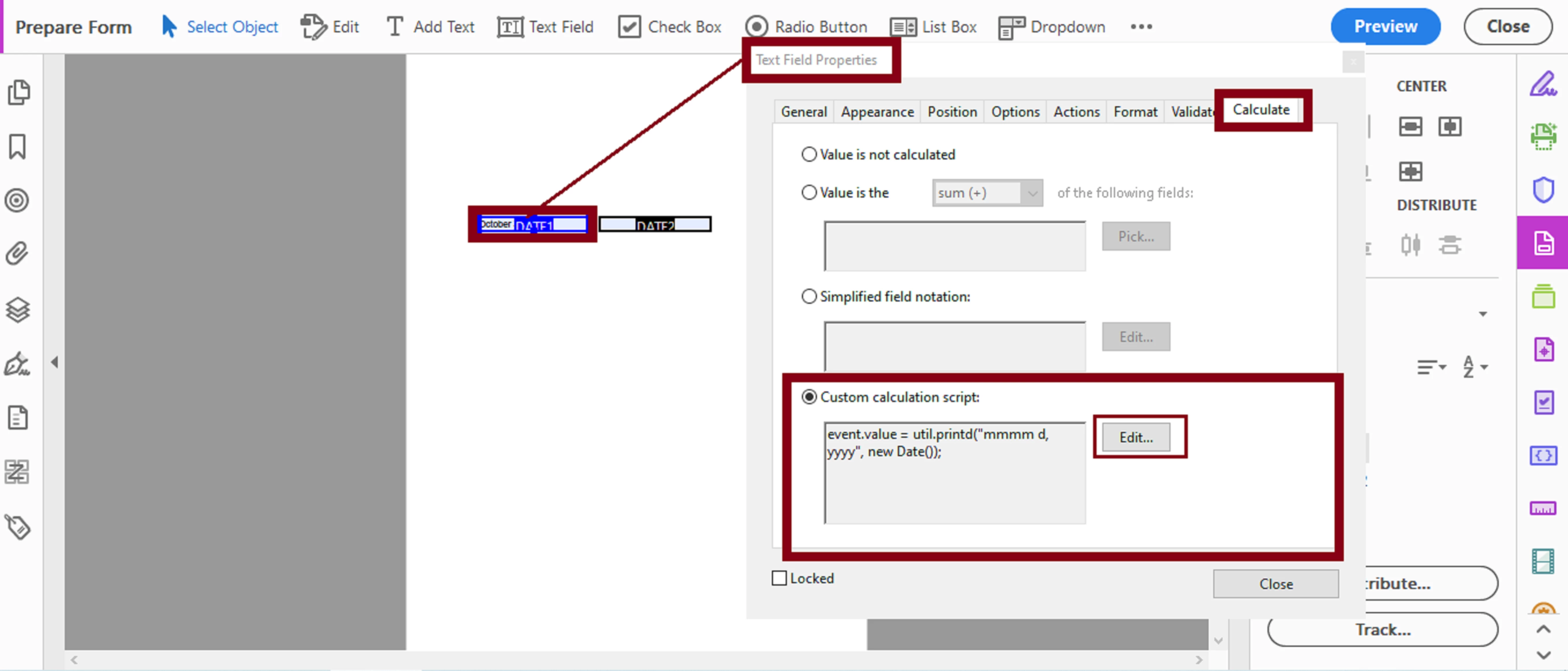


Then add the following script to the "DATE2" field:


var strStart = this.getField("DATE1").value;
var strEnd = this.getField("DATE2").value;

if (strStart.length && strEnd.length) {

  var dateStart = util.scand("mmmm d, yyyy",strStart);
  var dateEnd = util.scand("mmmm d, yyyy",strEnd);


if  (dateEnd.getTime() < dateStart.getTime() ) {

app.alert("The end date can't be earlier than the start date. This document will close now.!");

this.resetForm(["DATE2"]);

this.closeDoc();

this.dirty = false;

  }
}


Let me know if this script(s) meet your intent.


1 reply

ls_rbls
Community Expert
ls_rblsCommunity ExpertCorrect answer
Community Expert
October 31, 2020

Hi, 


You can do this by creating two date fields.


In my example I will use "DATE1" for the field that will be populating the current date automatically, and "DATE2" which is the field that I will run my calculation script from.


So first, to insert a script in a field object you need to select the "Prepare Form" tool in order to be able to edit the field properties of any field objects in your PDF. Then right-click on the desired field and select from the context menu "Properties". This will open up the field properties dialogue box.


Go ahead and click on the "Calculate" tab of "DATE1" , you may copy the following script below and paste it in the "Custom Calculation Script Section" as shown in the slide below: 


event.value = util.printd("mmmm d, yyyy", new Date());


Then add the following script to the "DATE2" field:


var strStart = this.getField("DATE1").value;
var strEnd = this.getField("DATE2").value;

if (strStart.length && strEnd.length) {

  var dateStart = util.scand("mmmm d, yyyy",strStart);
  var dateEnd = util.scand("mmmm d, yyyy",strEnd);


if  (dateEnd.getTime() < dateStart.getTime() ) {

app.alert("The end date can't be earlier than the start date. This document will close now.!");

this.resetForm(["DATE2"]);

this.closeDoc();

this.dirty = false;

  }
}


Let me know if this script(s) meet your intent.


Participant
November 2, 2020
hola amigo,

primeramente estoy muy agradecido por su atención a responder y aclarar mis
dudas, realice el script que me envió , pero algo no me resulta, le
envío adjunto el documento para que lo pueda revisar.

atentamente
juan vargas
Participant
November 2, 2020
amigo, si funciona se lo agradezco mucho