
Completing PPP Loan Application as Form
I apologize for my line of questioning, as they result from the COVID-19, PPP loan program.
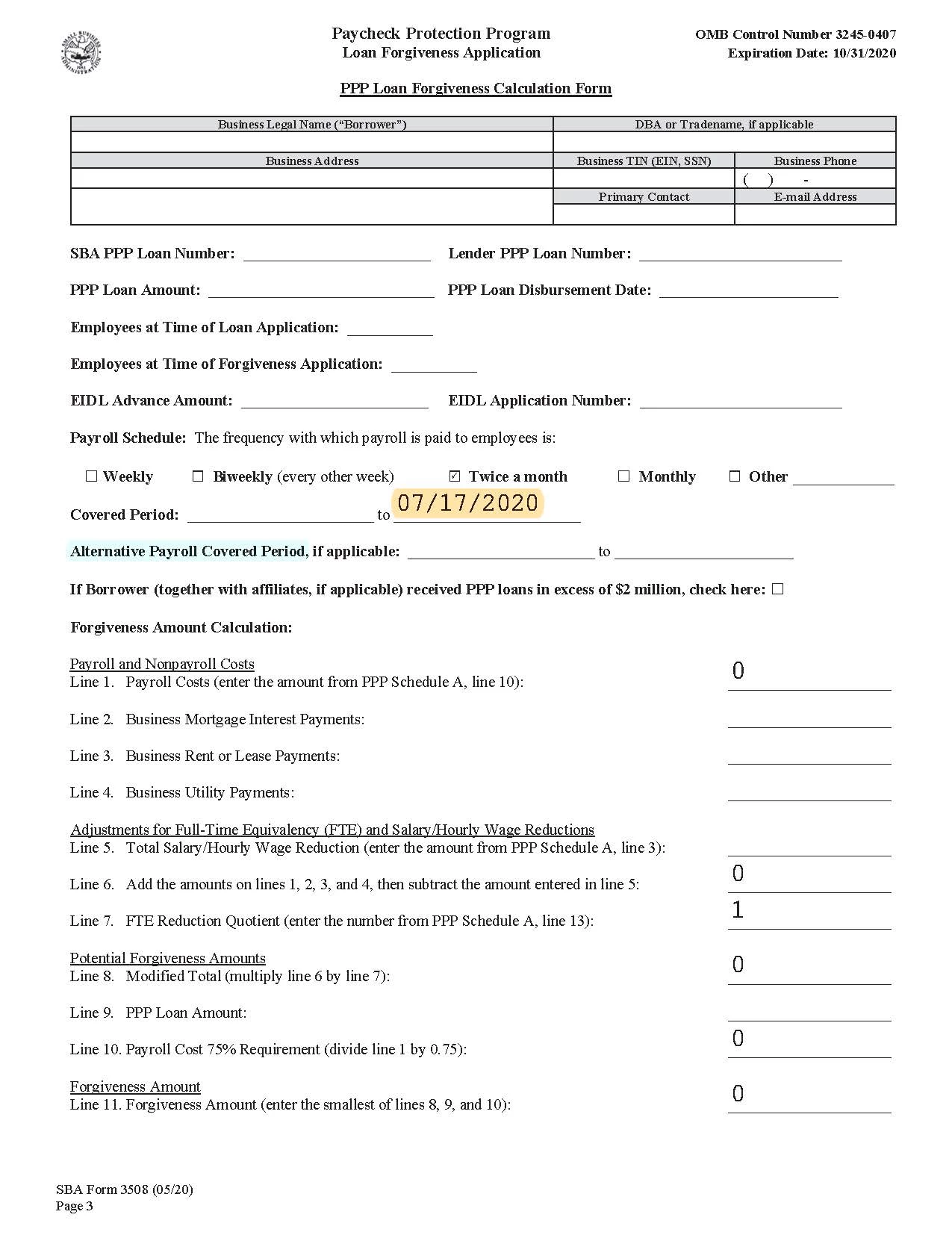
With SBA releasing their loan forgiveness application within the last fortnight, most accountants have chosen to create a spreadsheet based upon the PDF of the PPP loan application. However, I have chosen to do the reverse: adding calculation fields to the PDF of the PPP loan application; adding spreadsheet -like features to the PDF.
In a previous post, I found a formula to calculate and add 56 days to the funding date, thus automatically calculating the ending covered period date.
Now, I am experiencing two problems that I would like to resolve:
- When the Beginning Date field is blank, there still is a value in the ending date field
- And, if it is decided to use the Alternate Payroll Covered Period line, then the Covered Period cannot be used, the two are mutually exclusive
- So, if there is an entry on the Alternate Payroll Covered Period line, then there can be no entries on the first, the Covered Period line, and vice a versa
Now I have seen in the checkbox fields, where only one field can be checked, and is somehow set up that if one box is checked, then the other boxes are unchecked, and I’m looking to do something like that with these date field lines.
Any ideas?
And, thanks in advance.
 AdChoices