Participant
March 1, 2022
Question

Compliance report

  • March 1, 2022
  • 2 replies
  • 627 views

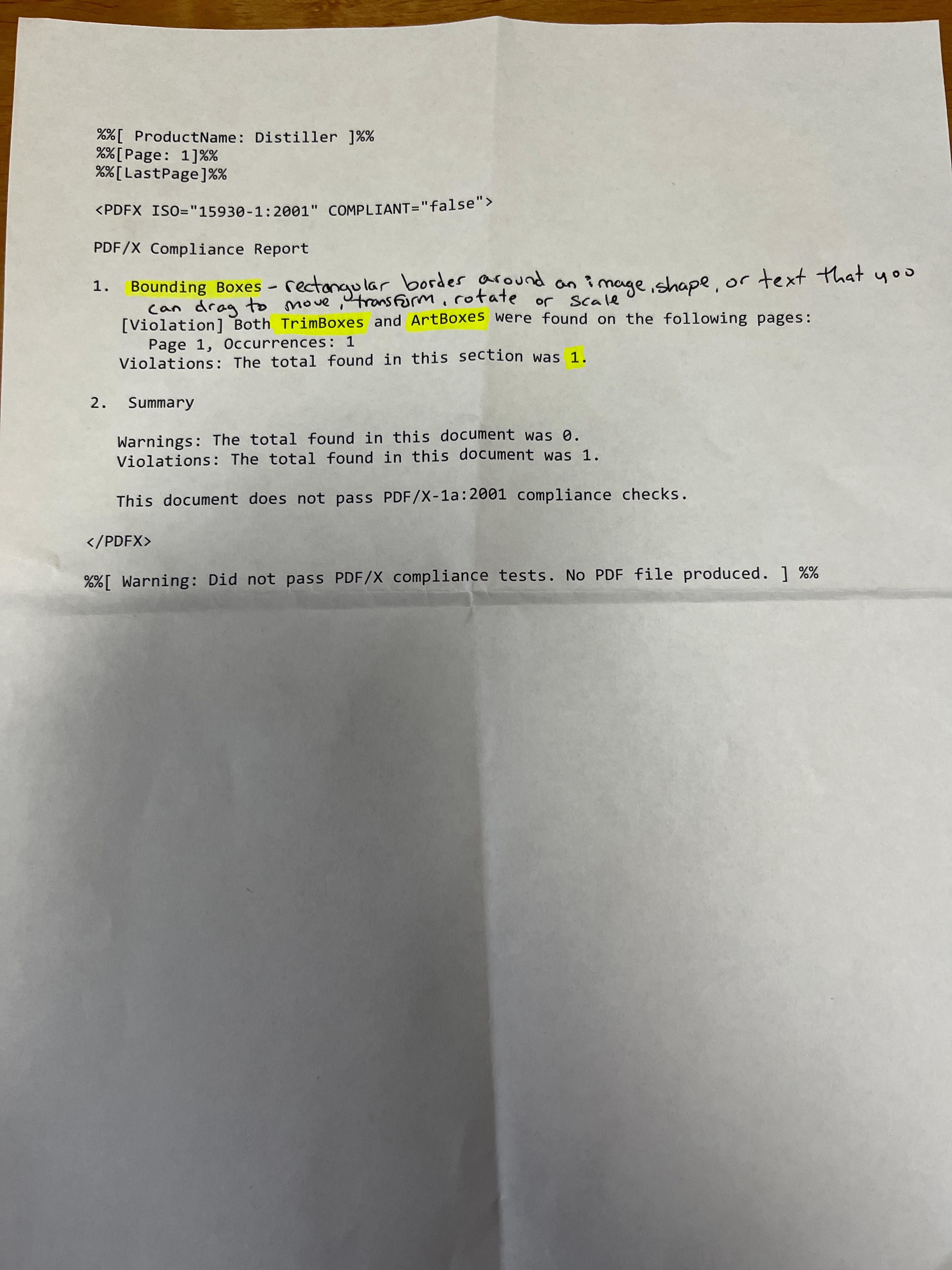
I'm running into an issue with bounding boxes. I have a picture attached. I don't know how to go around this to continue 🤷🏻‍♀️

This topic has been closed for replies.

2 replies

Legend
March 1, 2022

In this case, the definition of Bounding Box you have added does not apply. This is simply something in the PDF describing a box on the page; it is not something you can drag. There are up to five kinds of bounding box in a page. PDF/X does not allow TrimBox and ArtBox. Go back to the PDF creation tool and look for an option to turn it off.

Participant
March 2, 2022

Thank you for the help! If I turn them off will it cause a change in what is printed? I'm printing books and my cover is where the problem is.

Participant
March 2, 2022

I'm printing books from an outside source that prints.

radzmar
Community Expert
Community Expert
March 1, 2022

Acrobat comes with the tool Preflight which can check file agains several PDF-standards and or convert them. You should try this to fix you problem.


Note: If you're no working in the print business (flyer, brochures, magazines etc.) you propably won't need to create a PDF/X conform PDF. Change the settings of you Distiller then. 


Participant
March 1, 2022

Thank you for your help!!