Participant
April 12, 2025
Answered

Comprobaciones Acrobat panel en blanco

  • April 12, 2025
  • 1 reply
  • 145 views

Cuando quiero abrir el panel de comprobaciones de Acrobat este esta en blanco, tengo la version 2025.001.20435, instalo y desinstanlo la aplicacion pero nada cambia.

Correct answer creative explorer

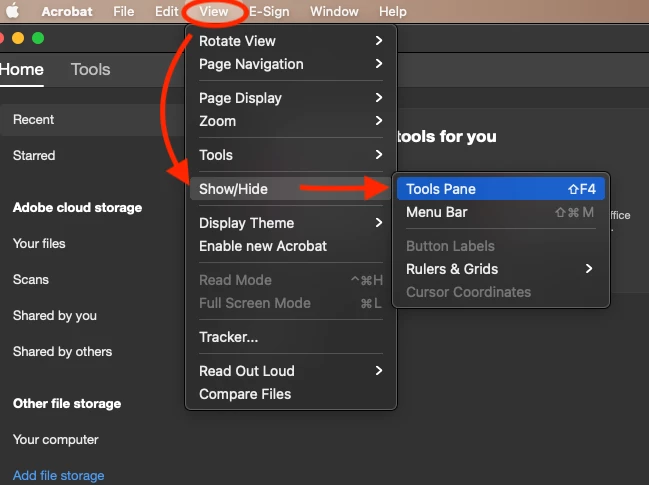
@Cele_Alvarezzz The first thing I would do is to check if my panels are showin. Did you check and verified - Go to View > Show/Hide > Tools Pane.


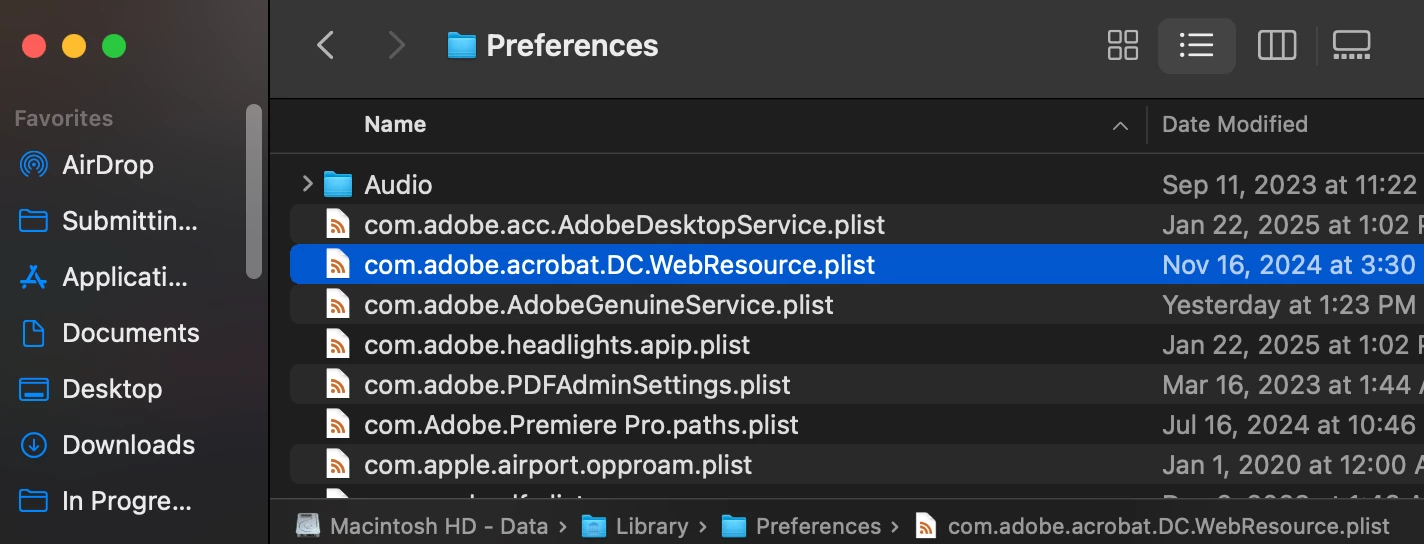
If this still doesn't work, even though you have uninstall and reinstall Acrobat, did you do use Adobe Cleaner. If you didn't, I would use it to make sure that is use to remove any old Adobe software, cleaning corrupt installation files, and fixing your host files to establish a connection with Adobe servers. I wouldn't use any other third party website to do this. I would also make sure and delete any preferences of Acrobat. Hard Drive/Library/Preferences/Acrobat. I remember when I replaced my battery, my computer got weird out, and Apple told me to select veruthing in the 'Preferences' folder, and delete it. I loterally have over 2 gigs of data.... now, I have 388kb! 
 

Then go back to adobe.com or Creative Cloud app and re-download Acrobat and install it. 

I be geuninely surprsied this doesn't fix it, but if by a slight chance it doesn't, i the issue started recently, it's possible that the current version has a bug. If you have access to a previous version of Acrobat, you could try installing it temporarily to see if the "Checks" panel works there.



 

1 reply

creative explorer
Community Expert
creative explorerCommunity ExpertCorrect answer
Community Expert
April 12, 2025

@Cele_Alvarezzz The first thing I would do is to check if my panels are showin. Did you check and verified - Go to View > Show/Hide > Tools Pane.


If this still doesn't work, even though you have uninstall and reinstall Acrobat, did you do use Adobe Cleaner. If you didn't, I would use it to make sure that is use to remove any old Adobe software, cleaning corrupt installation files, and fixing your host files to establish a connection with Adobe servers. I wouldn't use any other third party website to do this. I would also make sure and delete any preferences of Acrobat. Hard Drive/Library/Preferences/Acrobat. I remember when I replaced my battery, my computer got weird out, and Apple told me to select veruthing in the 'Preferences' folder, and delete it. I loterally have over 2 gigs of data.... now, I have 388kb! 


Then go back to adobe.com or Creative Cloud app and re-download Acrobat and install it. 

I be geuninely surprsied this doesn't fix it, but if by a slight chance it doesn't, i the issue started recently, it's possible that the current version has a bug. If you have access to a previous version of Acrobat, you could try installing it temporarily to see if the "Checks" panel works there.



m