marynm92817612
Participant
December 13, 2021
Question

Conditional font color based on radio selection

  • December 13, 2021
  • 1 reply
  • 381 views

Hi community,


I am stuck on a pdf form condition. I have tried many options but none seem to be working for me. I am very new to all this so I am hoping someone will be able to help.

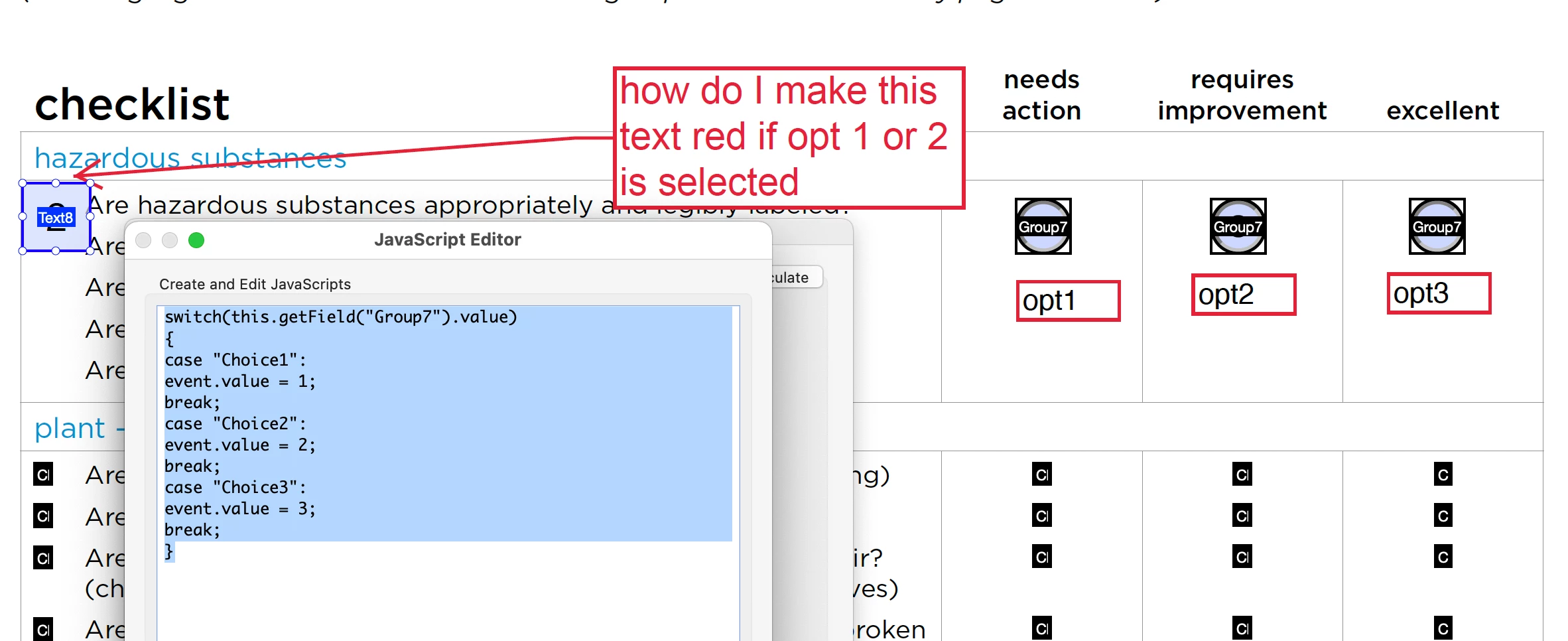
I have a form that will have radio buttons. If user selects Option 1, the number 1 will show up in the text box beside the statement. If the user selects Option 2, the number 2 will show up, etc.


I have been able to achieve this using the following code in the calulations script:

switch(this.getField("Group7").value)

{ case "Choice1": event.value = 1;

break;

case "Choice2": event.value = 2; break;

case "Choice3": event.value = 3; break; }


I am wonder how I can make the text red if it is a value of 1 or 2.


Thank you!

This topic has been closed for replies.

1 reply

Nesa Nurani
Community Expert
Community Expert
December 13, 2021

Try this as 'Validation' script:

if(event.value == 1 || event.value == 2)
event.target.textColor = color.red;
else event.target.textColor = color.black;

marynm92817612
Participant
December 13, 2021

That worked perfectly! Thank you.


I think I misunderstood the request for this project.


Can you kindly let me know if this at all doable in a pdf form.


This is what I am being asked for.

  1. Consequent to selecting any one of the buttons in columns 1 or 2 only the respective row (highlighted in yellow) either should turn the font to red or become bold or underlined (someway to notify that there needs to be a corrective action created)
  2. Instead of the check box at the start of the row, there should be a sequential number generated i.e. 1, 2,3, 4 
  3. This sequential number should auto-populate the Heading into the corrective action sheet.