Participant
May 24, 2022
Question

Conditional Formatting and Changing Text Box Colors when values are not equal

  • May 24, 2022
  • 2 replies
  • 2615 views

Hello,


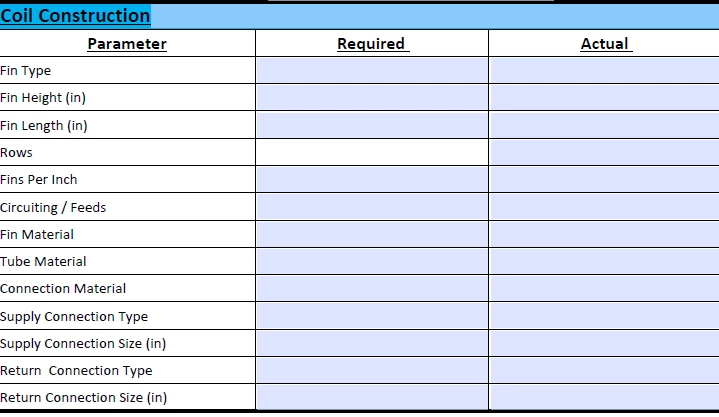
I am trying to conditional format in my form on Adobe acrobat Pro DC. What im trying to acheive is to have the text box in the field "Actual" to change to the color red when it does not match the value listed in the "required" field. I have been looking online, but have not found anything for when the values are not equal. Could someone please provide me a javascript code?


Thank-you for the help in advance!


This topic has been closed for replies.

2 replies

Nesa Nurani
Community Expert
Community Expert
May 24, 2022

Not equal in javascript is != you can use it like this:

if(event.value != this.getField("required").value)

event.target.fillColor = color.red;

You need to turn off field highlight or you won't be able to see colors.

Participant
May 24, 2022

i keep getting this type error when i enter in the above code - is there a solution to resolve this error?


try67
Community Expert
Community Expert
May 24, 2022

Enter the correct field name as the parameter of gertField. It's not "required".

Amal.
Legend
May 24, 2022

Hi there


Hope you are doing well and sorry for the trouble.


The workflow you are trying to achieve is possible using the JavaScript.  For more information about using JavaScript, please check the help pages listed below:

https://helpx.adobe.com/acrobat/using/applying-actions-scripts-pdfs.html

https://acrobatusers.com/tutorials/javascript_console/


Hope this information will help


Regards

Amal

Participant
May 24, 2022

Good Day Amal, 


I am aware that i need to use Java script as previously stated in my question - what im asking for is the proper formula/code to input into the java script.


Thankyou,