sziayee
Participant
April 13, 2018
Answered

conditional formatting & display as text

  • April 13, 2018
  • 1 reply
  • 3735 views

HI

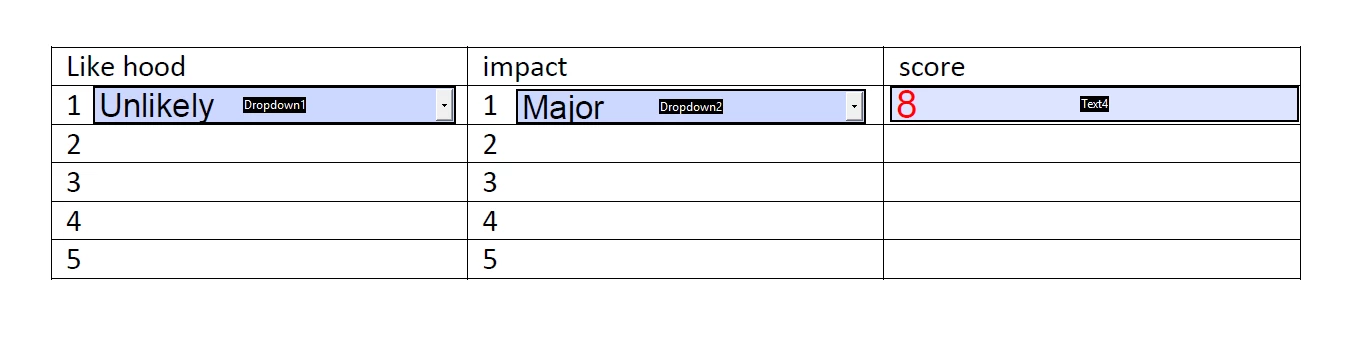
I am building a risk calculator based on two values Like hood and impact final value is Risk sore (along with a description). I had included basic calculate function and its giving me answers. I want to add different colour fills based on certain range and the name of risk in text to show in the last colum, for example, in spite showing me 8 it should also show me "Low" text value

please help me

i am not from IT background

Thanks a lot

This topic has been closed for replies.
Correct answer try67

Like Hood values

1-Rare

2-Unlikely

3-Possible

4-Likely

5-Certain

Impact value

1-Insignificant

2-Minor

3-Moderate

4-Major

5-castrotrophic

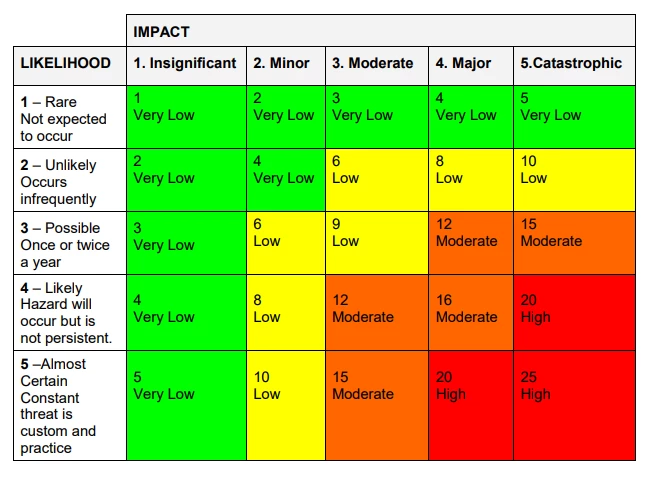
The Score column is multiplying Both Like hood and Impact and giving me final score but I need to add text of

“Very Low” to value range of 1-5--------Filled colour Green

“Low” to value range of 6-11------------Filled colour Yellow

“Moderate” to value range of 12-16------Filled colour Amber or Orange

“High” to value range of 17-20 -------------Filled colour Red

The table is as shown below
Thanks in advance


OK, you can use this code as the custom calculation script of your score field:

var score = Number(this.getField("Dropdown1").valueAsString) * Number(this.getField("Dropdown2").valueAsString);

if (score==0) {

    event.value = "";

    event.taret.fillColor = color.transparent;

} else if (score<=5) {

    event.value = score + " : Very Low";

    event.taret.fillColor = color.green;

} else if (score<=11) {

    event.value = score + " : Low";

    event.taret.fillColor = color.yellow;

} else if (score<=16) {

    event.value = score + " : Moderate";

    event.taret.fillColor = ["RGB", 1, 0.64, 0];

} else if (score<=20) {

    event.value = score + " : High";

    event.taret.fillColor = color.red;

}

1 reply

try67
Community Expert
Community Expert
April 13, 2018

First of all, it's "Likelihood", not "Like hood"...

And it seems you want to implement two different things:

- Change the text color based on the score

- Add additional text to the score field, beside the number.

Is that correct?

sziayee
sziayeeAuthor
Participant
April 13, 2018

Yes that's all I want

It might be very simple but i don't have IT background rather a pharma background --Sorry

Thanks for correcting the English too as i did not notice while typing

try67
Community Expert
Community Expert
April 13, 2018

OK. What is the formula for the score field, exactly?

Also, what colors and texts do you want to use, and for what ranges of scores?